Close Menu

    Subscribe to Updates

    Get the latest creative news from FooBar about art, design and business.

    What's Hot

    Polar Launches Screen-Free Wearable Band: The Polar Loop

    December 6, 2025

    Describe a Scene and Alexa+ Will Take You There on Prime Video: Amazon Unveils Smart Scene Jump Feature

    December 6, 2025

    Royal Enfield Brings 70s Biker Cool Back with VALLON Moto Aviators Collection

    December 5, 2025
    Facebook X (Twitter) Instagram YouTube
    • Subscribe to the Magazine
    • Join our Newsletter
    • BBC TopGear India
    • Influencer News
    Sunday, December 7
    Facebook X (Twitter) Instagram Pinterest YouTube Tumblr LinkedIn
    Exhibit TechExhibit Tech
    • Home
    • Tech & AI
      • Tech News
      • Tech Launches
      • Tech Features
      • Gaming
      • AI & Robotics
      • Social Media
      • Cybersecurity
      • FinTech
      • Crypto
      • Space
      • Software & Apps
    • Reviews
      • Smartphone Reviews
      • Smartwatch Reviews
      • Headphone Reviews
      • Laptop Reviews
      • Tablet Reviews
      • Earbud Reviews
      • Camera
      • Speakers
      • PC components
      • Accessories
      • Best TV Reviews in India – Find Your Next Screen with Exhibit.tech
      • Compare the Best Gadgets in India – Smartphones, Laptops, Wearables & More
      • Best Gadget to use
    • Auto
      • Auto News
      • Auto Reviews
      • Auto Tech
      • Vehicles
        • Cars
        • Bikes
    • Lifestyle
      • Travel
      • Entertainment
        • Fashion
        • Sports
        • OTT
        • Music
        • Movies
      • Watches
      • Health
      • Sneakerhead
      • Lifestyle Features
    • Guides
      • Explained
      • How To’s
      • How Big Is
      • Tips and Tricks
      • Screw Ups
    • Interviews
      • Creators
      • Tech Talks
      • Celebrities
      • Top 100 Leaders
        • Tech & Auto 2025
      • Founder’s club
      • Petrol Head
      • Marketing Minds
      • Editor’s note
    • Events
      • Influencex Awards
        • InfluencEX Awards Winners 2025
        • InfluencEX Awards Winners 2024
        • InfluencEX Awards Winners 2023
      • Exhibit Tech Awards
        • Tech Awards Winners 2025
        • Tech Awards Winners 2024
        • Tech Awards Winners 2023
      • Tech Fashion Tour
      • TopGear India Awards
    • Deals and Offer
    Exhibit TechExhibit Tech
    Home >> Explained >> Spice Up Your iPhone With A New Look
    Explained

    Spice Up Your iPhone With A New Look

    By Sandesh BhosleJune 14, 20212 Mins Read
    Facebook Twitter Pinterest LinkedIn Tumblr Email
    Share
    Facebook Twitter LinkedIn Pinterest Email

    Creating a customized iPhone home screen is always in trend as people use the same few apps every day and seem visually bored, which is obvious for every individual, but not everyone’s aware of it and if you’re one of them, then take a look at the following article.

    Personalizing things according to your intelligence or individualized style has its magic, and when you have an opportunity to do the same with your iPhone or iPad where you can change nearly any app icon on your iPhone or iPad using the built-in Shortcuts app, then why not go ahead and do it? 

    Here’s how to customize your iPhone’s app icons using the Shortcuts app? But before you go ahead, make sure you have got the following things.

    • Updated device to at least iOS 14 or iPadOS 14
    • The pre-installed Shortcuts app
    • The pictures that you want to use for new icons

    Once you confirm the above three things, follow these steps:

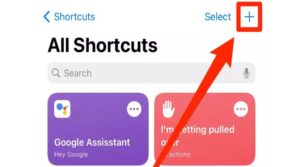
    • Open the Shortcuts app and tap the plus sign in the top-right corner. If you’re unable to find the app instantly on your home screen, swipe left till you reach the app library and type Shortcuts into the top search bar.
     

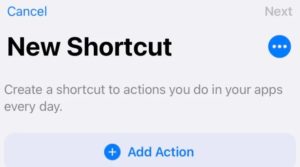
    • Select Add Action


    • Then search for the Open app, and tap on it.
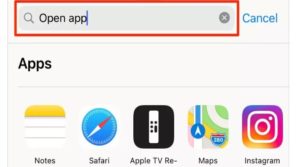
     

    • Tap Choose, and you’ll see a list of apps. Select the app you want to customize.
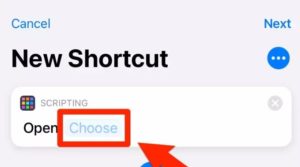
     

    • Select the three dots in the top-right corner to open an options menu and give the shortcut a name; you can make this the app’s actual name or a nickname. Lastly, tap Add to Home Screen. 

     

    • Tap the default icon next to the name to choose your new app icon. You can choose to Take Photo to snap a new picture, or Choose Photo to use an image you’ve saved to your Photos app, or Choose File to pick a picture in your device’s Files app and tap Add in the top-right.
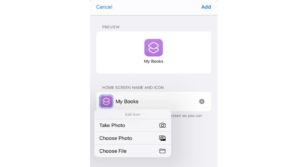
    Congrats! You’ve now got a new and fully functional app icon on your home screen. You might see two different icons for the same app. You can also hide the original app icon, so you’ll just have the new one visible.

    Share. Facebook Twitter Pinterest LinkedIn Tumblr Email

    Related Posts

    Firewall Explained

    November 29, 2025

    Does the Angle of Your Monitor Screen Really Influence Eye Strain?

    November 23, 2025

    LIDAR Explained

    November 8, 2025

    Comments are closed.

    Top Posts

    Firewall Explained
    November 29, 2025
    Does the Angle of Your Monitor Screen Really Influence Eye Strain?
    November 23, 2025
    LIDAR Explained
    November 8, 2025
    TBW (Terabytes Written) Explained
    September 30, 2025
    What Fits My Pocket – Budget ₹35,000
    August 11, 2025
    Exhibit Magazine | November 2025
    Stay In Touch
    • Facebook
    • YouTube
    • TikTok
    • Twitter
    • Instagram
    • Pinterest
    • LinkedIn
    • Reddit

    Subscribe to Updates

    Latest Posts
    Tech Launches

    Polar Launches Screen-Free Wearable Band: The Polar Loop

    Tech Launches By adminDecember 6, 2025
    Tech News

    Describe a Scene and Alexa+ Will Take You There on Prime Video: Amazon Unveils Smart Scene Jump Feature

    Tech News By Aadithya HarishDecember 6, 2025
    Auto & EV

    Royal Enfield Brings 70s Biker Cool Back with VALLON Moto Aviators Collection

    Auto & EV By Sohil NikamDecember 5, 2025

    Exhibit.Tech, we’re your one-stop destination for everything tech! Whether it’s breaking news about the latest launches from giants like Sony, Vivo, Apple, Huawei, OnePlus, Sennheiser, Poco, and more, or in-depth reviews of mobiles, smartwatches, headphones, TVs, and earbuds – we’ve got you covered.

    Our reviews go beyond the surface, highlighting the pros and cons to help you make informed buying decisions. We’re here to simplify your tech journey with practical tips, tricks, and comprehensive “how-to” guides across a wide range of topics.

    Think of us as your friendly tech companion, helping you stay updated and make sense of the ever-evolving tech world with clarity and ease. At Exhibit.Tech, we make tech work for you!

    Most Popular

    ChatGPT for iOS May Soon Integrate Apple Health to Deliver Personalized Wellness Insights

    December 4, 2025

    Apple’s AI Chief John Giannandrea to Exit After Tumultuous Generative AI Struggles

    December 2, 2025

    Firewall Explained

    November 29, 2025
    Our Pick

    MumbaiHacks 2025 Makes History in Agentic AI: Insights from Organizer Dhruvil Sanghvi

    December 4, 2025

    Mr. James Sung on How MSI’s RTX 50 Series Is Powering India’s Next Generation of Gamers and Creators

    December 3, 2025

    Exclusive Interview: Arun Babu on Why FUJIFILM Chose India to Debut the GFX ETERNA 55

    November 26, 2025
    Facebook X (Twitter) Instagram Pinterest YouTube
    • About Us
    • Careers
    • Contact Us
    © 2025 Exhibit Technologies | All Rights Reserved

    Type above and press Enter to search. Press Esc to cancel.