


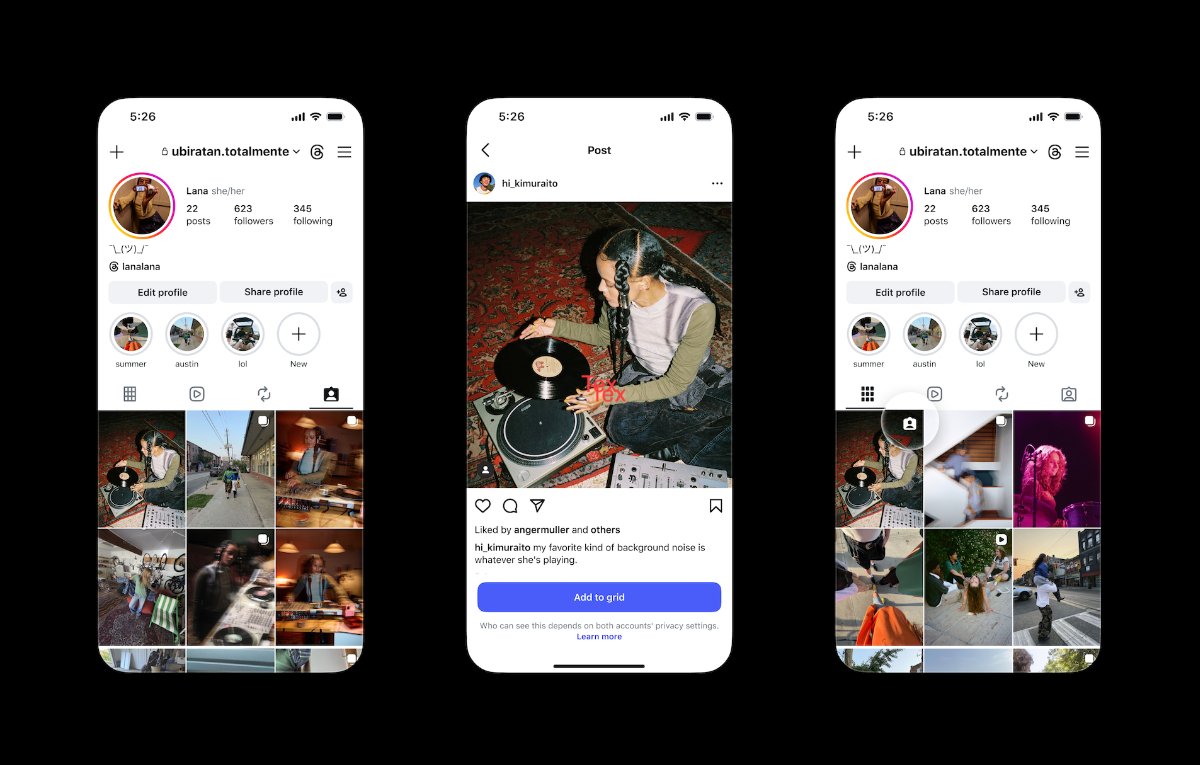
Instagram has brought out a new feature that lets users add tagged posts to their main profile grid. The update gives people more control over how their profile looks, and it solves a common problem: someone tags you in a great group photo, but the post sits unnoticed in your Tagged tab instead of showing up alongside your own content.
Until now, tagged posts stayed separate from your grid by default. With this update, you can choose which tagged posts deserve a spot next to your own uploads. This works well for group photos, creator collaborations, and other shared memories you want to show off on your profile.
You can add a tagged post to your grid in three ways. You can do it straight from the DM notification you get when someone tags you. You can also use the three-dot menu on the tagged post itself. Or you can press and hold a post in your Tagged tab.
Also Read: The Cannes for Influencers? Meta Announces the Edits Film Festival
Once added, a tagged post appears on your main grid in reverse-chronological order by default. However, if you’ve already reordered your grid, your layout stays exactly as you set it. You can also remove a tagged post from your main grid at any time. Removing it doesn’t delete the original post, and it doesn’t remove the post from your Tagged tab either.
This update comes after Instagram’s “Reorder Your Grid” feature, which lets users rearrange their main grid without changing post order or timestamps. These updates tie into Instagram’s move toward giving users more say over how their profile looks and feels.
2 Comments
Pingback: Instagram Rings 2026: The Creativity Award
Pingback: Farah Khan on Why Authenticity Matters in Short-Form Content