


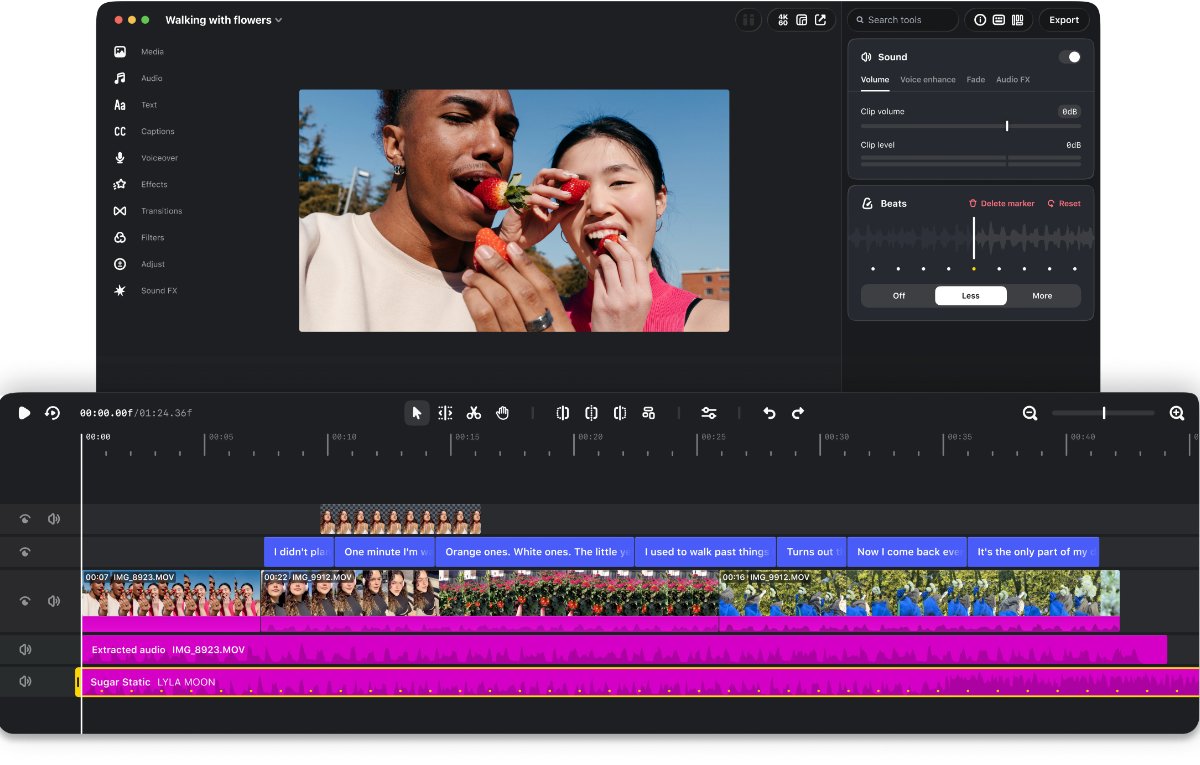
Instagram has launched the desktop version of Edits video editing app for macOS and has added more advanced editing tools for creators. The new version is designed for larger projects that require more precise controls, allowing users to work with multiple clips and detailed timelines on a bigger screen
The desktop editor includes a multi-track timeline, keyframes for transitions and audio waveforms for more precise editing. Users can also access colour wheels, log conversions and curves for colour grading. The app supports importing custom LUTs and font files, giving creators more control than the phone app.
Like the mobile version, Edits on desktop offers Instagram’s licensed and royalty-free audio libraries, along with hundreds of sound and video effects. It also includes automatic captions with support for multiple languages. Audio and text styles saved in the mobile app are available on desktop, while users can customise keyboard shortcuts or carry over shortcuts from other editing software.
Also Read: Instagram Rings 2026: The Creativity Award
Another key addition is the ability to post videos directly to Instagram from the desktop editor. Users can add tags, locations and trial reels without having to transfer their projects to a phone. For creators working across different platforms, Edits also supports horizontal and vertical aspect ratios, along with 4K watermark-free exports.
Instagram says it will continue to release weekly updates based on creator feedback. The company is also working on allowing users to edit the same project seamlessly across desktop and mobile, although this feature is still in development.
The Edits desktop app is currently available for macOS and can be downloaded from https://edits.instagram.com/desktop/