

Apple has rolled out the first public beta of iOS 26.4 shortly after seeding the developer beta earlier this week. The latest update brings new features across Apple Music, Apple Podcasts, Messages, Health and more.
From AI-powered playlist creation to video podcast support and improved security protections, here is everything new in the iOS 26.4 public beta.
What’s New in iOS 26.4 Public Beta
Apple Music Gets AI Playlist Creation
iOS 26.4 introduces a new Prompted Playlist feature in Apple Music. Users can now generate playlists by typing a mood, theme or idea.
For example, entering phrases like “late night study session” or “gym motivation” will create a 25-song playlist with a custom title. The update also adds a new home screen widget for quicker access to ambient music playlists.
This feature simplifies playlist creation and offers a more personalised listening experience.
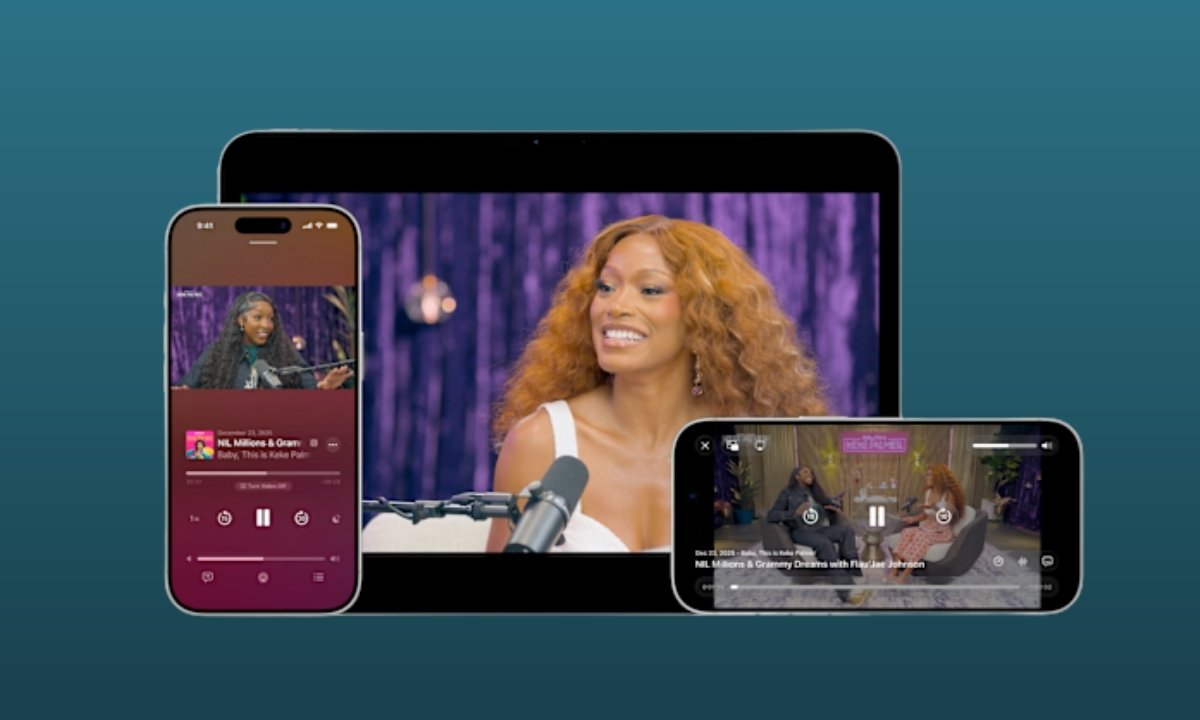
Apple Podcasts Adds Video Support
Apple Podcasts now supports video episodes using HTTP Live Streaming technology.
Users can switch between watching and listening within the same episode. Video podcasts can also be downloaded for offline viewing, making the app more versatile for different types of content consumption.
RCS End-to-End Encryption in Testing
Apple has confirmed that RCS end-to-end encryption is available for testing in this beta. However, the feature will not fully roll out in iOS 26.4 and is expected to arrive in a future software update.
Once enabled, RCS encryption will improve privacy and security for cross-platform messaging.
Stolen Device Protection Now Enabled by Default
With iOS 26.4, Stolen Device Protection is turned on by default for all users.
Sensitive actions require Face ID or Touch ID authentication. Certain changes may also trigger a one-hour security delay, adding an extra layer of protection if the device is stolen.
Reminders App Adds “Urgent” Section
The Reminders app now includes a dedicated “Urgent” section.
Urgent reminders come with a built-in alarm to ensure users receive strong alerts when tasks are due. This update is designed to prevent missed deadlines and important tasks.
Health App Introduces New Sleep Metric
The Health app adds a new “Average Bedtime” metric under the Sleep section.
In the United States, Apple has also refreshed the Vitals section by including blood oxygen level data in the daily line graph overview. These updates aim to provide clearer and more detailed wellness insights.
Freeform Creator Studio Expansion
Freeform Creator Studio subscribers now gain access to expanded creative tools, including premium graphics, photos, illustrations and AI-powered image creation tools. The update also introduces a refreshed app icon.
iOS 26.4 Public Beta: Eligible iPhone Models
The update is available for the following devices:
iPhone 17 Series
- iPhone 17
- iPhone 17 Pro
- iPhone 17 Pro Max
- iPhone Air
iPhone 16 Series
- iPhone 16
- iPhone 16 Plus
- iPhone 16 Pro
- iPhone 16 Pro Max
- iPhone 16e
iPhone 15 Series
- iPhone 15
- iPhone 15 Plus
- iPhone 15 Pro
- iPhone 15 Pro Max
iPhone 14 Series
- iPhone 14
- iPhone 14 Plus
- iPhone 14 Pro
- iPhone 14 Pro Max
iPhone 13 Series
- iPhone 13
- iPhone 13 mini
- iPhone 13 Pro
- iPhone 13 Pro Max
iPhone 12 Series
- iPhone 12
- iPhone 12 mini
- iPhone 12 Pro
- iPhone 12 Pro Max
iPhone 11 Series
- iPhone 11
- iPhone 11 Pro
- iPhone 11 Pro Max
iPhone SE
- iPhone SE (2nd generation and later)
How to Download and Install iOS 26.4 Public Beta
To install the update:
- Sign up for the Apple Beta Software Program
- Open Settings on your iPhone
- Go to General > Software Update
- Tap Beta Updates
- Select iOS 26 Public Beta
- Return to the Software Update page
- Agree to the terms and download the update
Important: Always back up your iPhone before installing beta software, as early versions may contain bugs or performance issues.
Should You Install iOS 26.4 Public Beta?
If you want early access to AI playlist creation, video podcasts, enhanced security features and improved health tracking, the iOS 26.4 public beta offers several useful upgrades.
However, since this is a beta release, users may experience bugs or stability issues. It is recommended to install it on a secondary device if possible and wait for the stable version for everyday use.