

Close Menu

    Subscribe to Updates

    Get the latest creative news from FooBar about art, design and business.

    What's Hot

    Anuj Sidharth, Director Marketing and Communication, MediaTek India and SEA Region

    January 23, 2026

    Apoorva Saigal, AVP Corporate Communication and 2W Marketing, Piaggio Group – CMO Special

    January 23, 2026

    Sonia Shenoy | Creator Of The Month

    January 23, 2026
    Facebook X (Twitter) Instagram YouTube
    • Subscribe to the Magazine
    • Join our Newsletter
    • BBC TopGear India
    • Influencer News
    Friday, January 23
    Facebook X (Twitter) Instagram Pinterest YouTube Tumblr LinkedIn
    Exhibit TechExhibit Tech
    • Home
    • Tech & AI
      • Tech News
      • Tech Launches
      • Tech Features
      • Gaming
      • AI & Robotics
      • Social Media
      • Cybersecurity
      • FinTech
      • Crypto
      • Space
      • Software & Apps
    • Reviews
      • Smartphone Reviews
      • Smartwatch Reviews
      • Headphone Reviews
      • Laptop Reviews
      • Tablet Reviews
      • Earbud Reviews
      • Camera
      • Speakers
      • PC components
      • Accessories
      • Best TV Reviews in India – Find Your Next Screen with Exhibit.tech
      • Compare the Best Gadgets in India – Smartphones, Laptops, Wearables & More
      • Best Gadget to use
    • Auto
      • Auto News
      • Auto Reviews
      • Auto Tech
      • Vehicles
        • Cars
        • Bikes
    • Lifestyle
      • Travel
      • Entertainment
        • Fashion
        • Sports
        • OTT
        • Music
        • Movies
      • Watches
      • Health
      • Sneakerhead
      • Lifestyle Features
    • Guides
      • Explained
      • How To’s
      • How Big Is
      • Tips and Tricks
      • Screw Ups
    • Interviews
      • Creators
      • Tech Talks
      • Celebrities
      • Top 100 Leaders
        • Tech & Auto 2025
      • Founder’s club
      • Petrol Head
      • Marketing Minds
      • Editor’s note
    • Events
      • Influencex Awards
        • InfluencEX Awards Winners 2025
        • InfluencEX Awards Winners 2024
        • InfluencEX Awards Winners 2023
      • Exhibit Tech Awards
        • Tech Awards Winners 2025
        • Tech Awards Winners 2024
        • Tech Awards Winners 2023
      • Tech Fashion Tour
      • TopGear India Awards
    • Deals and Offer
    Exhibit TechExhibit Tech
    Home >> Tech News >> Incognito Tabs: More Security With New Google Update
    Tech News

    Incognito Tabs: More Security With New Google Update

    By Abhishek SinghJuly 21, 20213 Mins Read
    Facebook Twitter Pinterest LinkedIn Tumblr Email
    Incognito Tabs
    Google is bringing a new update for iOS.
    Share
    Facebook Twitter LinkedIn Pinterest Email

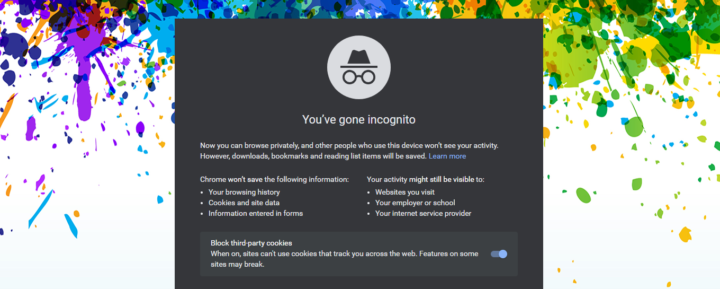
    Incognito tabs. These are no less than relief for many who don’t want to share their history with anyone. These modes get preference by those who don’t Google Chrome to remember their password and leak it in case of a hacker entering the system. In a nutshell, it is like a safe haven about which you have read in economics that helps to reduce taxation obligation. But, what if you come to know that you can be more secure through incognito modes. Well, many will get ready to leave the general window of the Chrome browser. But, there’s a condition. This means it is not applicable to everyone. Google has recently announced that people having gadgets with iOS as an operating system can lock and secure their incognito modes through Face IDs. Let’s know more about it through this Exhibit blog. 

    I Am Safer

    Isn’t that linguistically incorrect? But, you will pass on such statements after the news reported by Macrumors. According to this news, Google is bringing a new update for iOS through which a user will get the allowance and access to lock their incognito modes through Face ID, Touch ID, or passcode. Once the update comes out, you will be able to find this feature by going to the Settings option and selecting the Privacy tab. In the tab, you will see the option for Lock Incognito tabs. 

    What do you mean by Locked Incognito tabs?

    It means it won’t be visible unless authenticated for the next time. What’s that? Suppose you exited from the Chrome browser and thought to reopen it. Now, if you try to open the incognito mode, you won’t be able to open it. You can do this only after authenticating it through Face ID, Touch ID, or passcode. 

    Anything else added apart from Incognito Tabs

    Yeah, it will be pretty illogical to say that Google’s technical team has merely added this feature at the development front. That’s for sure Google’s technical team is not sitting at the development centres singing, “Nothing’s gonna change my love for you.” The other feature that is coming as an update is regarding taking a screenshot of the entire web page. Now, every time you will strike the combination of keys to trigger a screenshot, an option will appear that will ask for a full page. 

    Conclusion

    Google has added sophisticated features to secure incognito modes and tabs to ensure better privacy. However, only time will tell how it helps.

    Google touchid
    Share. Facebook Twitter Pinterest LinkedIn Tumblr Email

    Related Posts

    Zebronics Acquires iBall in Strategic Move to Revitalize Brand

    January 22, 2026

    Amazon Launches Echo Show 11 and New Echo Show 8 Enter India with Smarter Home Automation Features

    January 20, 2026

    Ai+ Unveils NovaWatch Smartwatch Lineup for 2026 Launch

    January 19, 2026

    Comments are closed.

    Top Posts

    Zebronics Acquires iBall in Strategic Move to Revitalize Brand
    January 22, 2026
    Amazon Launches Echo Show 11 and New Echo Show 8 Enter India with Smarter Home Automation Features
    January 20, 2026
    Ai+ Unveils NovaWatch Smartwatch Lineup for 2026 Launch
    January 19, 2026
    Google Meet Adds Automatic Room Check-In, and It Just Made Meetings Smarter
    January 17, 2026
    WhatsApp May Soon Let Parents Control Kids’ Accounts What We Know So Far
    January 8, 2026
    Exhibit Magazine | January 2026
    Stay In Touch
    • Facebook
    • YouTube
    • TikTok
    • Twitter
    • Instagram
    • Pinterest
    • LinkedIn
    • Reddit

    Subscribe to Updates

    Latest Posts
    Interviews

    Anuj Sidharth, Director Marketing and Communication, MediaTek India and SEA Region

    Interviews By Aadithya HarishJanuary 23, 2026
    Interviews

    Apoorva Saigal, AVP Corporate Communication and 2W Marketing, Piaggio Group – CMO Special

    Interviews By Aadithya HarishJanuary 23, 2026
    Creators

    Sonia Shenoy | Creator Of The Month

    Creators By Exhibit StaffJanuary 23, 2026

    Exhibit.Tech, we’re your one-stop destination for everything tech! Whether it’s breaking news about the latest launches from giants like Sony, Vivo, Apple, Huawei, OnePlus, Sennheiser, Poco, and more, or in-depth reviews of mobiles, smartwatches, headphones, TVs, and earbuds – we’ve got you covered.

    Our reviews go beyond the surface, highlighting the pros and cons to help you make informed buying decisions. We’re here to simplify your tech journey with practical tips, tricks, and comprehensive “how-to” guides across a wide range of topics.

    Think of us as your friendly tech companion, helping you stay updated and make sense of the ever-evolving tech world with clarity and ease. At Exhibit.Tech, we make tech work for you!

    Most Popular

    OpenAI Introduces ChatGPT Translate and It Does More Than Google Translate

    January 16, 2026

    Alexa Plus Comes to the Web and Amazon Is Rethinking AI Assistants

    January 7, 2026

    OpenAI’s First Hardware Could Ditch Screens and Rely Fully on Voice

    January 6, 2026
    Our Pick

    Sonia Shenoy | Creator Of The Month

    January 23, 2026

    Vedansh Kumar, Head of Brand Marketing, boAt – CMO Special

    January 22, 2026

    Pratip Francis, General Manager – Brand Marketing, MRF – CMO Special

    January 22, 2026
    Facebook X (Twitter) Instagram Pinterest YouTube
    • About Us
    • Careers
    • Contact Us
    © 2026 Exhibit Technologies | All Rights Reserved

    Type above and press Enter to search. Press Esc to cancel.