


Close Menu

    Subscribe to Updates

    Get the latest creative news from FooBar about art, design and business.

    What's Hot

    How to Hide Your Likes on Instagram Reels

    November 15, 2025

    LinkedIn Rolls Out New AI People Search: Find Professionals Using Natural Language

    November 15, 2025

    BenQ Launches ScreenBar Halo 2 Monitor Light in India

    November 14, 2025
    Facebook X (Twitter) Instagram YouTube
    • Subscribe to the Magazine
    • Join our Newsletter
    • BBC TopGear India
    • Influencer News
    Sunday, November 16
    Facebook X (Twitter) Instagram Pinterest YouTube Tumblr LinkedIn
    Exhibit TechExhibit Tech
    • Home
    • Tech & AI
      • Tech News
      • Tech Launches
      • Tech Features
      • Gaming
      • AI & Robotics
      • Social Media
      • Cybersecurity
      • FinTech
      • Crypto
      • Space
      • Software & Apps
    • Reviews
      • Smartphone Reviews
      • Smartwatch Reviews
      • Headphone Reviews
      • Laptop Reviews
      • Tablet Reviews
      • Earbud Reviews
      • Camera
      • Speakers
      • PC components
      • Accessories
      • Best TV Reviews in India – Find Your Next Screen with Exhibit.tech
      • Compare the Best Gadgets in India – Smartphones, Laptops, Wearables & More
      • Best Gadget to use
    • Auto
      • Auto News
      • Auto Reviews
      • Auto Tech
      • Vehicles
        • Cars
        • Bikes
    • Lifestyle
      • Travel
      • Entertainment
        • Fashion
        • Sports
        • OTT
        • Music
        • Movies
      • Watches
      • Health
      • Sneakerhead
      • Lifestyle Features
    • Guides
      • Explained
      • How To’s
      • How Big Is
      • Tips and Tricks
      • Screw Ups
    • Interviews
      • Creators
      • Tech Talks
      • Celebrities
      • Top 100 Leaders
        • Tech & Auto 2025
      • Founder’s club
      • Petrol Head
      • Marketing Minds
      • Editor’s note
    • Events
      • Influencex Awards
        • InfluencEX Awards Winners 2025
        • InfluencEX Awards Winners 2024
        • InfluencEX Awards Winners 2023
      • Exhibit Tech Awards
        • Tech Awards Winners 2025
        • Tech Awards Winners 2024
        • Tech Awards Winners 2023
      • Tech Fashion Tour
      • TopGear India Awards
    • Deals and Offer
    Exhibit TechExhibit Tech
    Home >> AI & Robotics >> Google Meet Adds ‘Ask Gemini AI’ to Summarize, Catch Up, and Boost Productivity
    AI & Robotics

    Google Meet Adds ‘Ask Gemini AI’ to Summarize, Catch Up, and Boost Productivity

    By Aadithya HarishSeptember 22, 20252 Mins Read
    Facebook Twitter Pinterest LinkedIn Tumblr Email
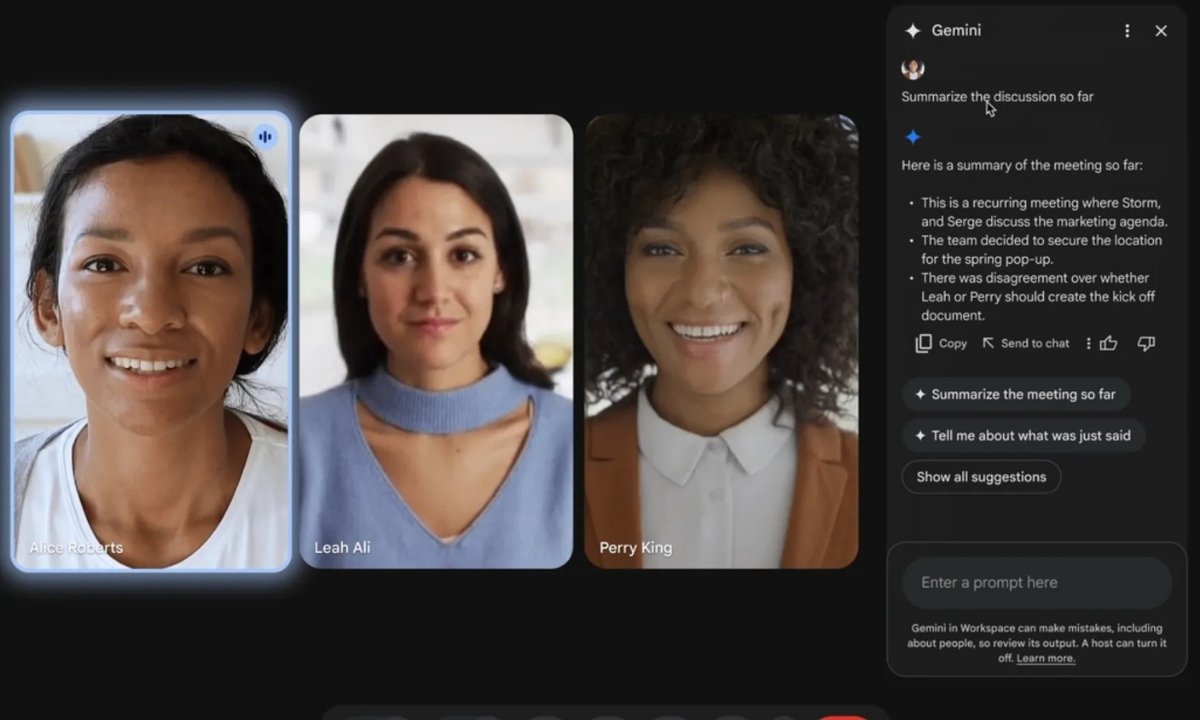
    Google Meet X Gemini
    Share
    Facebook Twitter LinkedIn Pinterest Email

    Google is bringing the power of its Gemini AI assistant directly into Google Meet, introducing new features that promise to make virtual meetings smarter and more productive. The new “Ask Gemini” in Meet tool can generate real-time summaries, highlight key action items, and even help latecomers catch up on discussions.

    What is Ask Gemini in Google Meet?

    The Ask Gemini AI assistant in Meet is designed to simplify collaboration during video calls. With this tool, users can:

    • Summarize ongoing discussions
    • Review what has been said so far
    • Identify action items and decisions
    • Catch up on missed parts of the meeting (if the “Take Notes for Me” feature was enabled) 

    Google emphasized that responses generated by Gemini are personalized, pulling from meeting captions, Workspace resources (Docs, Sheets, Slides, Gmail), Google Search, and other accessible content.

    Data Privacy and Limitations

    Google clarified that meeting captions and data are not stored once the call ends. Ask Gemini also cannot provide details of conversations that took place before a participant joined, unless note-taking was activated. Currently, the feature supports only English and works exclusively on desktop devices. Breakout rooms are not supported yet.

    Also Read: iOS 26 vs iOS 18: The Shocking Truth Apple Didn’t Tell You

    Controls for Admins, Hosts, and Participants

    • Admins: Enabled by default, but can be turned off at the organization or group level via the Workspace Admin console.
    • Hosts/Co-hosts: Can disable Ask Gemini from Calendar, in-meeting Gemini controls, or Host settings.
    • Participants: Will see a consent message when Ask Gemini is active. Dial-in users will hear an announcement. Those without Smart Features enabled cannot access it. 

    Availability and Rollout

    The feature is initially available to Google Workspace Business Plus customers. Rollout begins on September 29, 2025, for Rapid Release domains and will continue into October for Scheduled Release domains, completing by October 17, 2025.

    Google also confirmed that Enterprise Standard, Enterprise Plus, and other Workspace plans will receive Ask Gemini later in late 2025 or early 2026, after user feedback is reviewed.

    Gemini AI Google
    Share. Facebook Twitter Pinterest LinkedIn Tumblr Email

    Related Posts

    Jio’s Free Google AI Pro Subscription Is Now Available for Everyone

    November 10, 2025

    Google Unveils ‘Project Suncatcher’: Testing AI Data Centres in Space

    November 6, 2025

    Reliance and Google Partner to Offer Free Gemini AI Access for Jio 5G Users

    October 31, 2025

    2 Comments

    1. Pingback: Microsoft Urges H-1B Staff to Stay in U.S. After $100K Fee

    2. Pingback: Apple Watch Series 11: Detect High Blood Pressure Alerts

    Leave A Reply Cancel Reply

    You must be logged in to post a comment.

    Top Posts

    Jio’s Free Google AI Pro Subscription Is Now Available for Everyone
    November 10, 2025
    Google Unveils ‘Project Suncatcher’: Testing AI Data Centres in Space
    November 6, 2025
    Reliance and Google Partner to Offer Free Gemini AI Access for Jio 5G Users
    October 31, 2025
    OpenAI Launches ‘Atlas’ Browser to Take on Google Chrome
    October 22, 2025
    AI Is Using Your Data to Set Prices And It Might Be Charging You More
    October 21, 2025
    Exhibit Magazine | October 2025
    Stay In Touch
    • Facebook
    • YouTube
    • TikTok
    • Twitter
    • Instagram
    • Pinterest
    • LinkedIn
    • Reddit

    Subscribe to Updates

    Latest Posts
    How To's

    How to Hide Your Likes on Instagram Reels

    By Shintu DhangNovember 15, 2025
    Tech News

    LinkedIn Rolls Out New AI People Search: Find Professionals Using Natural Language

    By Aadithya HarishNovember 15, 2025
    Tech Launches

    BenQ Launches ScreenBar Halo 2 Monitor Light in India

    By Shintu DhangNovember 14, 2025

    Exhibit.Tech, we’re your one-stop destination for everything tech! Whether it’s breaking news about the latest launches from giants like Sony, Vivo, Apple, Huawei, OnePlus, Sennheiser, Poco, and more, or in-depth reviews of mobiles, smartwatches, headphones, TVs, and earbuds – we’ve got you covered.

    Our reviews go beyond the surface, highlighting the pros and cons to help you make informed buying decisions. We’re here to simplify your tech journey with practical tips, tricks, and comprehensive “how-to” guides across a wide range of topics.

    Think of us as your friendly tech companion, helping you stay updated and make sense of the ever-evolving tech world with clarity and ease. At Exhibit.Tech, we make tech work for you!

    Most Popular

    LIDAR Explained

    November 8, 2025

    OpenAI to Launch AI-Powered Hiring Platform by 2026

    September 6, 2025

    OpenAI Launches ‘Atlas’ Browser to Take on Google Chrome

    October 22, 2025
    Our Pick

    Instagram Brings Diwali Festivity to Stories and Videos with AI-Powered Effects

    October 16, 2025

    My Instagram Feed Knows Me Better Than My Close Ones

    October 16, 2025

    Encouraging Collaboration and Inspiration Through Follower Engagement

    October 16, 2025
    Facebook X (Twitter) Instagram Pinterest YouTube
    • About Us
    • Careers
    • Contact Us
    © 2025 Exhibit Technologies | All Rights Reserved

    Type above and press Enter to search. Press Esc to cancel.