

Close Menu

    Subscribe to Updates

    Get the latest creative news from FooBar about art, design and business.

    What's Hot
    8.3

    MSI Vector 16 HX AI Review: Desktop-Class Power in a Portable (But Heavy) Chassis

    March 6, 2026
    8.2

    Amazon Fire TV Stick 4K Select Review: Fast, Reliable, With Cloud Gaming Surprises

    March 6, 2026
    8.5

    Nothing Phone (4a) Review: Betting Big on Budget with a Glyph Twist

    March 5, 2026
    Facebook X (Twitter) Instagram YouTube
    • Subscribe to the Magazine
    • Join our Newsletter
    • BBC TopGear India
    • Influencer News
    Saturday, March 7
    Facebook X (Twitter) Instagram Pinterest YouTube Tumblr LinkedIn
    Exhibit TechExhibit Tech
    • Home
    • Tech & AI
      • Tech News
      • Tech Launches
      • Tech Features
      • Gaming
      • AI & Robotics
      • Social Media
      • Cybersecurity
      • FinTech
      • Crypto
      • Space
      • Software & Apps
    • Reviews
      • Smartphone Reviews
      • Smartwatch Reviews
      • Headphone Reviews
      • Laptop Reviews
      • Tablet Reviews
      • Earbud Reviews
      • Camera
      • Speakers
      • PC components
      • Accessories
      • Best TV Reviews in India – Find Your Next Screen with Exhibit.tech
      • Compare the Best Gadgets in India – Smartphones, Laptops, Wearables & More
      • Best Gadget to use
    • Auto
      • Auto News
      • Auto Reviews
      • Auto Tech
      • Vehicles
        • Cars
        • Bikes
    • Lifestyle
      • Travel
      • Entertainment
        • Fashion
        • Sports
        • OTT
        • Music
        • Movies
      • Watches
      • Health
      • Sneakerhead
      • Lifestyle Features
    • Guides
      • Explained
      • How To’s
      • How Big Is
      • Tips and Tricks
      • Screw Ups
    • Interviews
      • Creators
      • Tech Talks
      • Celebrities
      • Top 100 Leaders
        • Tech & Auto 2025
      • Founder’s club
      • Petrol Head
      • Marketing Minds
      • Editor’s note
    • Events
      • Influencex Awards
        • InfluencEX Awards Winners 2025
        • InfluencEX Awards Winners 2024
        • InfluencEX Awards Winners 2023
      • Exhibit Tech Awards
        • Tech Awards Winners 2025
        • Tech Awards Winners 2024
        • Tech Awards Winners 2023
      • Tech Fashion Tour
      • TopGear India Awards
    • Deals and Offer
    Exhibit TechExhibit Tech
    Home >> Gadget Reviews >> Accessories >> Amazon Fire TV Stick 4K Select Review: Fast, Reliable, With Cloud Gaming Surprises
    Accessories

    Amazon Fire TV Stick 4K Select Review: Fast, Reliable, With Cloud Gaming Surprises

    By Sohil NikamMarch 6, 20264 Mins Read
    Facebook Twitter Pinterest LinkedIn Tumblr Email
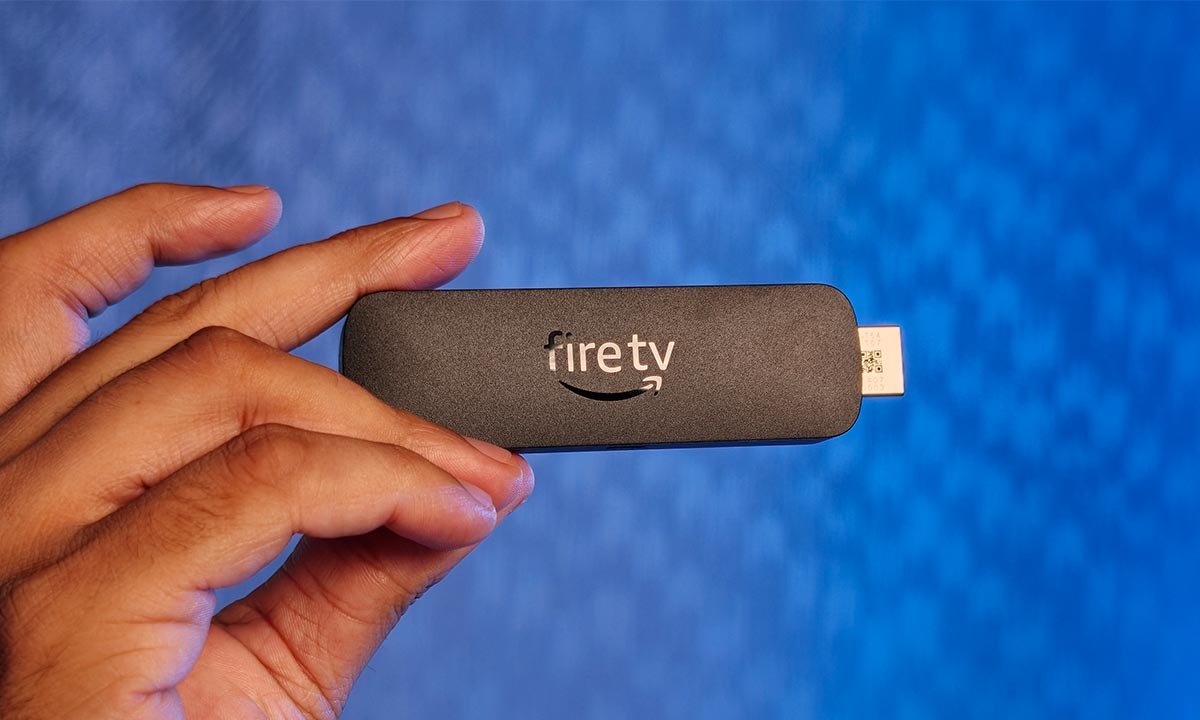
    Amazon-Fire-TV-Stick-4K-Select-01
    Share
    Facebook Twitter LinkedIn Pinterest Email

    Verdict

    8.2 Smooth Streaming, Missing Dolby

    Priced at ₹5,499, the Amazon Fire TV Stick 4K Select is a solid streaming device that prioritises reliability and ease of use over cutting-edge features. Setup is simple, the interface is smooth, and the remote remains one of the best in the business. Performance is dependable, and the ability to access cloud gaming through Xbox Game Pass adds an unexpectedly fun dimension to the device. However, the lack of Dolby Vision, Dolby Atmos, and sideloading support does limit its appeal, particularly for enthusiasts who want more flexibility or premium audiovisual capabilities. For users who simply want a fast, straightforward way to make their TV smarter, it does the job well. But if you’re expecting a fully featured streaming powerhouse at this price, you may find yourself wishing Amazon had gone just a little further.

    The Good
    1. Fast Performance
    2. Cloud Gaming Support
    3. Great Remote
    The Bad
    1. No Dolby Support
    2. No Sideloading
    • Design 8.5
    • Performance 9
    • Functionality 7
    • User Ratings (0 Votes) 0

    After spending a few days with the Amazon Fire TV Stick 4K Select, it becomes clear that Amazon’s approach here is evolutionary rather than revolutionary. The device doesn’t try to reinvent the streaming stick formula. It instead focuses on delivering a smooth, dependable smart TV experience, with an added dash of cloud gaming surprises. However, there are a few compromises that become noticeable once you begin using it extensively, especially if you’re someone who expects premium audio-visual formats or likes to tinker with your streaming setup.

    Design
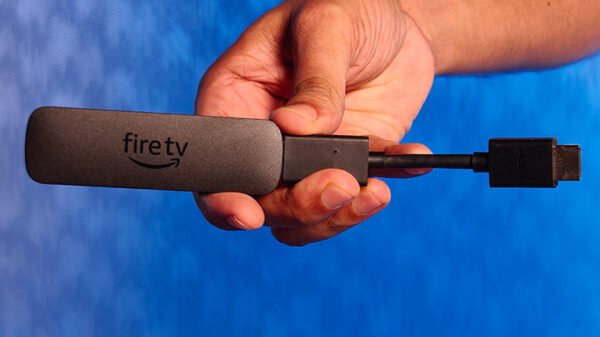
    Amazon-Fire-TV-Stick-4K-Select-02

    The Fire TV Stick 4K Select follows the familiar design language that Amazon has refined over multiple generations. The stick itself is compact and discreet, designed to disappear behind your television once plugged into the HDMI port. Amazon, of course, includes the much-loved small HDMI extender cable, which might seem trivial at first but proves extremely useful. Many televisions, especially wall-mounted ones, have tightly packed HDMI ports, and the extender makes installation much easier while improving Wi-Fi reception by slightly distancing the device from the TV chassis.

    Setup is straightforward and takes only a few minutes. Once powered and connected to Wi-Fi, the device quickly walks you through the Amazon login and basic configuration steps. Even first-time users will find the process painless. The remote control remains one of the best parts of the Fire TV ecosystem. Amazon clearly understands the principle of “if it isn’t broken, don’t fix it.” The remote is lightweight, intuitive, and ergonomically designed, with dedicated buttons for popular streaming services and a microphone button for voice commands.

    Performance

    Amazon-Fire-TV-Stick-4K-Select-05

    Performance is where the Fire TV Stick 4K Select feels most convincing. Navigation through the interface is quick, apps open without noticeable delays, and switching between streaming services feels smooth. During daily use, which involves browsing menus, launching apps, and streaming content, the stick rarely feels sluggish. Even heavier apps load fairly quickly, making the overall experience feel responsive and polished. The interface itself is heavily centred around Amazon’s ecosystem, but it remains easy to navigate and visually clean. Streaming apps like Netflix, Prime Video, and YouTube run without hiccups, and buffering was minimal during my testing.

    One of the more interesting experiences, however, came from using the device for cloud gaming. By pairing my PS5 controller and launching Xbox Game Pass (a combination that may sound blasphemous to hardcore gamers, but it is how things are now), I was able to play games directly through the streaming stick. The experience was surprisingly enjoyable. I didn’t have much time on my hands, so I just played a few matches of Call of Duty: Black Ops 7, which ran extremely smoothly. While this isn’t meant to replace a dedicated console, it did raise an interesting thought: for casual gamers, cloud gaming on a device this small could genuinely make you question whether you need a console at all.

    Do note, though, that our office space has a 1Gbps internet, so there’s no shortage of speed or bandwidth. For someone with a weak connection, the gaming experience will be different. The latency and streaming quality will depend heavily on your internet connection. That said, the fact that a tiny streaming stick can double as a gaming platform is quite impressive.

    Functionality

    Amazon-Fire-TV-Stick-4K-Select-03

    At its price point, many users would reasonably expect support for premium formats like Dolby Vision and Dolby Atmos, and their absence does feel like a slight miss. If you own a television and sound system that supports these formats, you might find yourself wishing Amazon had included them, especially considering how common they’ve become in streaming hardware today. That said, the overall picture quality is still quite satisfying. When streaming well-produced content, the stick delivers sharp visuals with vibrant colours and good contrast. I watched Dhurandhar on Netflix during my testing, and the way the visuals were rendered was genuinely impressive. The details came through clearly, motion handling felt smooth, and the image had a pleasing sense of depth that made the viewing experience enjoyable.

    Another limitation worth mentioning is the lack of support for sideloading apps. Users who enjoy installing third-party applications or experimenting beyond the official app ecosystem will likely see this as a drawback. Amazon clearly wants the experience to remain tightly controlled within its own ecosystem. On the upside, integration with Amazon Alexa works smoothly. With simple voice commands, you can search for content, control playback, or even manage smart home devices directly through your TV, which is a small but useful convenience that adds to the overall functionality of the device.


    Amazon
    Share. Facebook Twitter Pinterest LinkedIn Tumblr Email

    Related Posts

    MSI Vector 16 HX AI Review: Desktop-Class Power in a Portable (But Heavy) Chassis

    8.3 March 6, 2026

    Nothing Phone (4a) Review: Betting Big on Budget with a Glyph Twist

    8.5 March 5, 2026

    Xiaomi REDMI Note 15 Pro+ Review: The Pro That Doesn’t Procrastinate

    8.8 February 27, 2026
    Leave A Reply Cancel Reply

    You must be logged in to post a comment.

    Top Posts

    8.3
    MSI Vector 16 HX AI Review: Desktop-Class Power in a Portable (But Heavy) Chassis
    March 6, 20264 Views
    8.5
    Nothing Phone (4a) Review: Betting Big on Budget with a Glyph Twist
    March 5, 202618 Views
    8.8
    Xiaomi REDMI Note 15 Pro+ Review: The Pro That Doesn’t Procrastinate
    February 27, 202630 Views
    9.5
    Vivo X200T Review: A New Camera Contender
    February 25, 202646 Views
    8.0
    Alienware Aurora 16 Review: Desktop-Class Muscle in a Transportable Form
    February 24, 202640 Views
    Exhibit Magazine | February – March 2026
    Stay In Touch
    • Facebook
    • YouTube
    • TikTok
    • Twitter
    • Instagram
    • Pinterest
    • LinkedIn
    • Reddit

    Subscribe to Updates

    Latest Posts
    Gadget Reviews

    MSI Vector 16 HX AI Review: Desktop-Class Power in a Portable (But Heavy) Chassis

    8.3 Gadget Reviews By Sohil NikamMarch 6, 2026
    Accessories

    Amazon Fire TV Stick 4K Select Review: Fast, Reliable, With Cloud Gaming Surprises

    8.2 Accessories By Sohil NikamMarch 6, 2026
    Gadget Reviews

    Nothing Phone (4a) Review: Betting Big on Budget with a Glyph Twist

    8.5 Gadget Reviews By Shintu DhangMarch 5, 2026

    Exhibit.Tech, we’re your one-stop destination for everything tech! Whether it’s breaking news about the latest launches from giants like Sony, Vivo, Apple, Huawei, OnePlus, Sennheiser, Poco, and more, or in-depth reviews of mobiles, smartwatches, headphones, TVs, and earbuds – we’ve got you covered.

    Our reviews go beyond the surface, highlighting the pros and cons to help you make informed buying decisions. We’re here to simplify your tech journey with practical tips, tricks, and comprehensive “how-to” guides across a wide range of topics.

    Think of us as your friendly tech companion, helping you stay updated and make sense of the ever-evolving tech world with clarity and ease. At Exhibit.Tech, we make tech work for you!

    Most Popular

    AI Impact Summit 2026 Positions India as a Global Leader in Responsible Artificial Intelligence

    February 27, 202622 Views

    Large Language Models (LLMs) Explained

    February 19, 202612 Views

    Google’s Big AI Push in India: 10,000 Schools, 20 Million Public Servants, and a $15 Billion Cloud Bet

    February 19, 202622 Views
    Our Pick

    Facebook Now Lets You Animate Profile Photos With Meta AI: Here’s What’s New

    February 13, 2026

    Snapchat’s New Arrival Notifications Feature Is a Game Changer for Safety, Here’s How to Set It Up

    February 11, 2026

    Instagram May Soon Let You Exit Someone’s Close Friends List

    February 2, 2026
    Facebook X (Twitter) Instagram Pinterest YouTube
    • About Us
    • Careers
    • Contact Us
    © 2026 Exhibit Technologies | All Rights Reserved

    Type above and press Enter to search. Press Esc to cancel.