


Close Menu

    Subscribe to Updates

    Get the latest creative news from FooBar about art, design and business.

    What's Hot

    BenQ Launched MOBIUZ EX321UZ: A Premium 31.5-Inch QD-OLED Gaming Monitor

    May 19, 2026

    Amazon Brings Adapter-Less Fire TV Stick HD to India With Faster Performance and Wi-Fi 6

    May 19, 2026

    Mahindra’s Museum of Living History Continues to Evolve as a Celebration of Legacy and Purpose

    May 19, 2026
    Facebook X (Twitter) Instagram YouTube
    • Subscribe to the Magazine
    • Join our Newsletter
    • BBC TopGear India
    • Influencer News
    Thursday, May 21
    Facebook X (Twitter) Instagram Pinterest YouTube Tumblr LinkedIn
    Exhibit TechExhibit Tech
    • Home
    • Tech & AI
      • Tech News
      • Tech Launches
      • Tech Features
      • Gaming
      • AI & Robotics
      • Social Media
      • Cybersecurity
      • FinTech
      • Crypto
      • Space
      • Software & Apps
    • Reviews
      • Smartphone Reviews
      • Smartwatch Reviews
      • Headphone Reviews
      • Laptop Reviews
      • Tablet Reviews
      • Earbud Reviews
      • Camera
      • Speakers
      • PC components
      • Accessories
      • Best TV Reviews in India – Find Your Next Screen with Exhibit.tech
      • Compare the Best Gadgets in India – Smartphones, Laptops, Wearables & More
      • Best Gadget to use
    • Auto
      • Auto News
      • Auto Reviews
      • Auto Tech
      • Vehicles
        • Cars
        • Bikes
    • Lifestyle
      • Travel
      • Entertainment
        • Fashion
        • Sports
        • OTT
        • Music
        • Movies
      • Watches
      • Health
      • Sneakerhead
      • Lifestyle Features
    • Guides
      • Explained
      • How To’s
      • How Big Is
      • Tips and Tricks
      • Screw Ups
    • Interviews
      • Creators
      • Tech Talks
      • Celebrities
      • Top 100 Leaders
        • Tech & Auto 2025
      • Founder’s club
      • Petrol Head
      • Marketing Minds
      • Editor’s note
    • Events
      • Influencex Awards
        • InfluencEX Awards Winners 2025
        • InfluencEX Awards Winners 2024
        • InfluencEX Awards Winners 2023
      • Exhibit Tech Awards
        • Tech Awards Winners 2025
        • Tech Awards Winners 2024
        • Tech Awards Winners 2023
      • Tech Fashion Tour
      • TopGear India Awards
    • Deals and Offer
    Exhibit TechExhibit Tech
    Home >> Tech News >> Jio Fiber Users Can Use JioJoin App To Make Video Calls From TV
    Tech News

    Jio Fiber Users Can Use JioJoin App To Make Video Calls From TV

    By Sandesh BhosleAugust 5, 20212 Mins Read
    Facebook Twitter Pinterest LinkedIn Tumblr Email
    Jio Fiber Users Can Use JioJoin App To Make Video Calls From TV
    Share
    Facebook Twitter LinkedIn Pinterest Email

    We’ve missed a lot of events, functions and ceremonies due to the pandemic and its after-effects. Over a year, we’ve managed to watch our friends getting married or celebrating someone’s birthday through WhatsApp calls, but being there at the moment has its perks.

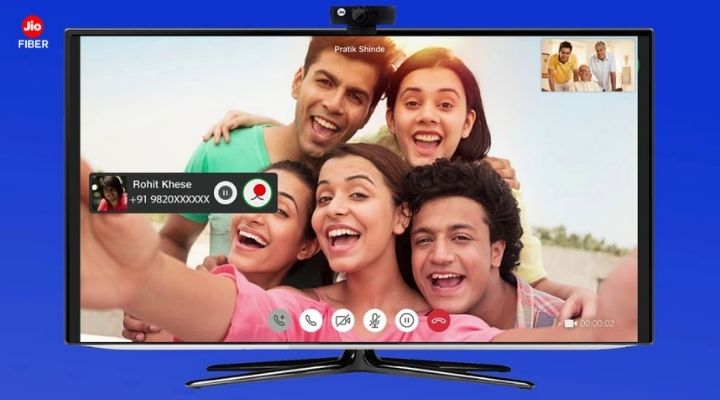
    Well, technology can not put you at the live event, but if you’re a Jio Fiber user, you can skip the small smartphone screen and make video calls from your TV. Jio has launched a new feature named ‘Camera on Mobile’ for its Jio Fiber users, where they can make video calls from their TVs without even connecting their TV’s to an external camera or a webcam. 

    The feature would let users make video calls from their TVs using the JioJoin app, previously termed the JioCall app. The app is available on Google Play Store and Apple’s App Store; after downloading the app, users will be required to download a 10-digit JioFiber number to connect their Android smartphones and iOS devices with the TV which enables video-calling through the JioFiberVoice.

    Once you’ve completed the configuration process, you can enable the ‘Camera on Mobile’ feature from the app. The enabling option will turn your smartphone into a web camera to make video calls via your TV. Jio Fiber users can use the same app to make voice calls using their landline number. 

    A step-by-step guide to help you use Jio’s ‘Camera on Mobile’ feature:

    1. Download the JioJoin app (works on Android phones running 6.0 and newer and iOS 10.0 and newer)
    2. Download the 10-digit Jio Fiber number and configure it on the JioJoin app
    3. Enable the ‘Camera on Mobile’ feature in the JioJoin app settings
    4. The option will turn your phone into a web camera, place it alongside the TV to make video calls

    Furthermore, Jio has urged users to get a 5GHz Wi-Fi band on their modems to experience better connectivity and quality in their video calls. The “Camera on Mobile’ feature will be beneficial for Smart TV’s that do not provide an inbuilt webcam.

    Jio
    Share. Facebook Twitter Pinterest LinkedIn Tumblr Email

    Related Posts

    Amazon Brings Adapter-Less Fire TV Stick HD to India With Faster Performance and Wi-Fi 6

    May 19, 2026

    Samsung Opens Registrations for 2026 Vision AI TVs Ahead of India Launch

    May 15, 2026

    Canon Bets Big on India’s Creator Boom With New EOS R6V Cinema-Focused Camera

    May 14, 2026

    Comments are closed.

    Top Posts

    Amazon Brings Adapter-Less Fire TV Stick HD to India With Faster Performance and Wi-Fi 6
    May 19, 2026
    Samsung Opens Registrations for 2026 Vision AI TVs Ahead of India Launch
    May 15, 2026
    Canon Bets Big on India’s Creator Boom With New EOS R6V Cinema-Focused Camera
    May 14, 2026
    boAt Enters Premium Audio With Snapdragon Sound-Powered Nirvana Eutopia 2 Pro
    May 7, 2026
    Qualcomm Brings Snapdragon 6 Gen 5 and 4 Gen 5 to India With Smoother Gaming, Faster Apps, and Better 5G
    May 7, 2026
    Exhibit Magazine | May 2026
    Stay In Touch
    • Facebook
    • YouTube
    • TikTok
    • Twitter
    • Instagram
    • Pinterest
    • LinkedIn
    • Reddit

    Subscribe to Updates

    Latest Posts
    Tech Launches

    BenQ Launched MOBIUZ EX321UZ: A Premium 31.5-Inch QD-OLED Gaming Monitor

    Tech Launches By Shintu DhangMay 19, 2026
    Tech News

    Amazon Brings Adapter-Less Fire TV Stick HD to India With Faster Performance and Wi-Fi 6

    Tech News By Sohil NikamMay 19, 2026
    Lifestyle

    Mahindra’s Museum of Living History Continues to Evolve as a Celebration of Legacy and Purpose

    Lifestyle By Sohil NikamMay 19, 2026

    Exhibit.Tech, we’re your one-stop destination for everything tech! Whether it’s breaking news about the latest launches from giants like Sony, Vivo, Apple, Huawei, OnePlus, Sennheiser, Poco, and more, or in-depth reviews of mobiles, smartwatches, headphones, TVs, and earbuds – we’ve got you covered.

    Our reviews go beyond the surface, highlighting the pros and cons to help you make informed buying decisions. We’re here to simplify your tech journey with practical tips, tricks, and comprehensive “how-to” guides across a wide range of topics.

    Think of us as your friendly tech companion, helping you stay updated and make sense of the ever-evolving tech world with clarity and ease. At Exhibit.Tech, we make tech work for you!

    Most Popular

    Apple Is About to Reinvent Siri Forever A Standalone AI App Could Change Your iPhone Experience

    March 26, 202632 Views

    Canva’s New Magic Layers Feature Turns AI Images Into Fully Editable Designs

    March 13, 202653 Views

    ChatGPT Just Got a Major Learning Upgrade: Math and Science Now Come Alive With Interactive Visuals

    March 11, 202634 Views
    Our Pick

    Interview: OPPO’s Goldee Patnaik Talks Brand’s Quiet Shift From Camera-First to Experience-First, And More

    May 9, 2026

    Amit Khatri (Co-Founder, Noise) Speaks on Master Buds 2: Features, Vision & More

    April 14, 2026

    Instagram Reels Just Got Smarter: Tap Once to Pause and Control Your Feed Like Never Before

    March 20, 2026
    Facebook X (Twitter) Instagram Pinterest YouTube
    • About Us
    • Careers
    • Contact Us
    © 2026 Exhibit Technologies | All Rights Reserved

    Type above and press Enter to search. Press Esc to cancel.