

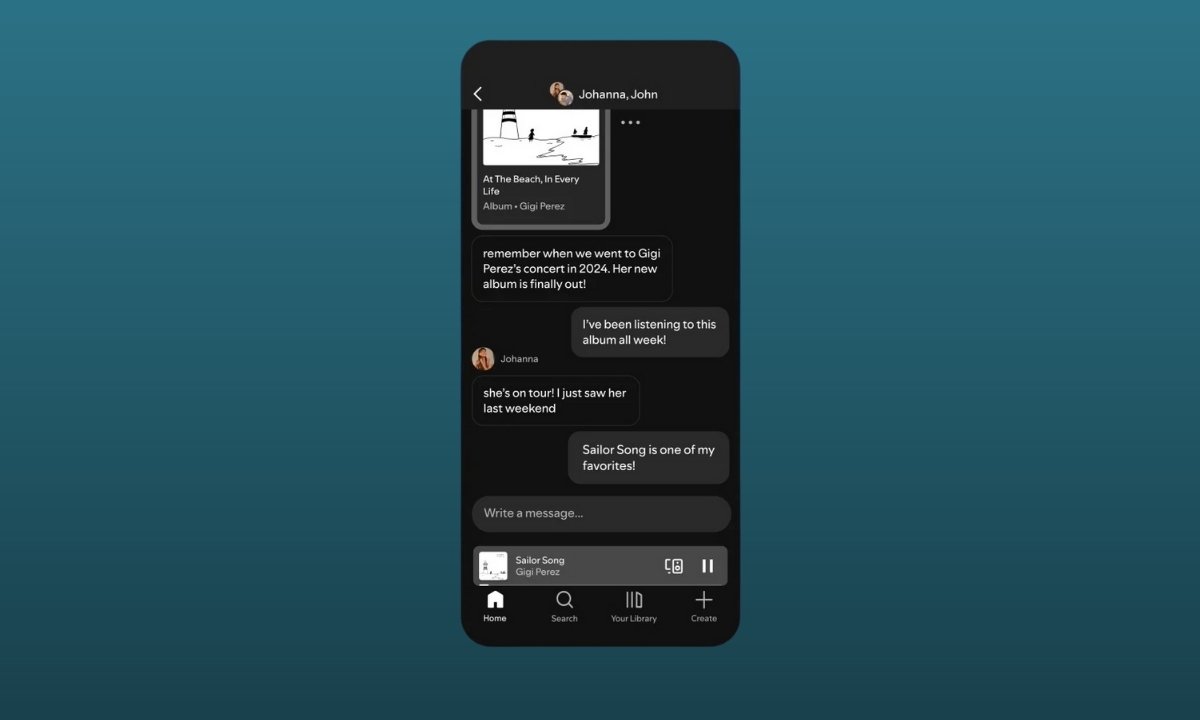
Spotify is taking its social ambitions a step further. The music streaming giant has officially expanded its in-app messaging feature to support group chats, allowing users to talk, react, and share audio content with up to 10 people at once without leaving the app.
The update builds on Spotify’s existing Messages feature, first introduced in August last year, and aims to make music discovery and discussion more interactive and personal.
Spotify Group Chats: What’s New?
With group chats now live, Spotify users can discuss and share songs, podcasts, playlists, and audiobooks directly inside the app. Until now, most music conversations happened on external platforms like WhatsApp or Instagram. Spotify wants to change that by keeping those conversations where the listening happens.
The experience feels familiar if you’ve already used Spotify’s one-to-one messaging, but it now supports group conversations with a few thoughtful limitations.
How Spotify’s Group Chats Work
Spotify says the feature is designed to keep conversations relevant and spam-free. As a result, users can’t start a group chat with just anyone.
Here’s how it works:
- You can only start a group chat with people you’ve previously interacted with on Spotify
- This includes users you’ve shared content with, created collaborative playlists with, joined Jam sessions with, or connected via the Blend feature
- If you haven’t interacted with someone before, they can still be added using a shared invite link
Once inside a group chat, members can instantly share and discuss what they’re listening to turning playlists into conversations and tracks into talking points.
Part of Spotify’s Bigger Social Push
Group chats are just the latest addition to Spotify’s growing list of social features. Over the years, the platform has introduced:
- Following other users
- Seeing what friends are listening to in real time
- Podcast comments
- Collaborative playlists and Jam sessions
Spotify has clarified that its messaging feature isn’t meant to replace music sharing on other apps. Instead, it’s designed to work alongside existing social platforms, making Spotify a more complete listening ecosystem.
Privacy and Security: What You Should Know
Spotify has confirmed that messages are encrypted both at rest and in transit, offering a basic level of security. However, the chats are not end-to-end encrypted, meaning Spotify can access message content if required.
How to Start a Group Chat on Spotify
Currently, the feature is available only on mobile and not on desktop. Here’s how you can start a group chat:
- Open the Spotify app on your phone
- Tap your profile icon in the top-right corner
- Select Messages
- Tap New Message or Create Group
- Add users you’ve interacted with, or invite others via a shared link
You can also start a group chat directly from the share menu of a song, podcast, or audiobook by choosing the group chat option.
Why This Matters
With group chats, Spotify is no longer just a place to listen, it’s becoming a place to connect, react, and discover together. For users who already share music daily, this update makes the experience faster, cleaner, and more immersive.