


Verdict
After six months, the Synology DiskStation DS925+ has proven to be one of the most quietly transformative tools in our workflow at Exhibit Magazine. It has streamlined how our video team moves terabytes of footage, how our photographers share their edits, and how the design desk accesses ready-to-publish visuals, all without the friction or downtime of cloud-based alternatives. It’s fast, reliable, and built for serious work, though its locked-down approach to drive compatibility and limited USB-C implementation still leave room for improvement. But in every practical sense, the DS925+ has justified its presence in our setup.
The Good
- Strong performance boost
- Expandable and flexible storage
- Strong software
The Bad
- Locked to Synology-branded drive
-
Design
-
Features
-
Performance
After six months of daily use, the Synology DiskStation DS925+ has become much more than just another NAS in our office space. It’s quietly become the backbone of Exhibit Magazine’s content production workflow. What started as a compact storage upgrade has turned into the system that keeps our video and photo teams in sync. Whether we’re moving 50GB of raw footage or sharing edited photos with our design desk, the DS925+ has made collaboration smoother, faster, and far less chaotic.
Compact System Handling Heavy Workloads
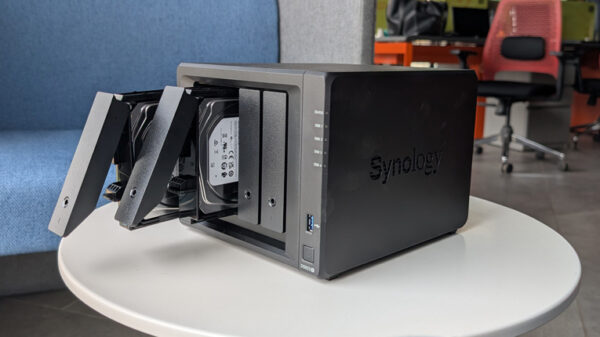
The DS925+ doesn’t look imposing, but it’s been handling serious workloads without a hiccup. Our video team regularly moves massive 4K video files, sometimes over 50GB per shoot, between systems, editors, and external contributors. With its dual 2.5GbE ports and strong internal performance, the NAS has consistently kept up. File transfers that used to be a headache are now completed in minutes instead of hours, and the team can collaborate directly on shared folders rather than juggling endless drives or Google Drive links.
Also Read: Synology BeeStation Review: A Personal Cloud That Just Works
The design has held up just as well. The four-bay layout still feels as practical as ever, the trays remain firm, and the cooling fans, while audible under heavy use, are effective and never intrusive. The only aspect that still feels underutilised is the USB-C expansion port at the back, which only works with Synology’s DX517 and not standard USB-C drives. For a device this capable, that limitation feels oddly outdated.
Built for Creative Workflows
The DS925+’s AMD Ryzen V1500B processor and DSM software have made it a natural fit for our production setup. Multiple editors can back up, edit, or stream files simultaneously without lag. Docker containers run background automation tasks, like syncing archives and maintaining local mirrors of project folders, all while DSM remains fast and responsive.
On my end, managing the magazine’s photo assets has become infinitely easier. I can quickly share entire photoshoot folders with photographers for editing, and once they upload the final shots, they’re instantly accessible to our design team. The process that once involved multiple hard drives and endless WeTransfer links now happens through a single, secure interface.
DSM Keeps It Simple and Reliable
Synology’s DSM software continues to be a major strength. Over these six months, updates have made it even more intuitive, with smarter file indexing and better permission management, which is essential for a team environment like ours. Synology Drive lets us treat the NAS almost like a private cloud, so working from home never comes with stress. What’s most impressive is its reliability. The DS925+ has been running nonstop for months without a single crash, failed update, or data hiccup. Even after a sudden power outage, the system rebooted cleanly and resumed operations instantly.
Compatibility Still Feels Restrictive
That said, Synology’s decision to restrict drive compatibility remains the one sore spot in the experience. For anyone expanding storage or setting up new volumes, the requirement to use Synology-branded drives is frustrating and adds to costs. Our DS925+ setup migrated smoothly from an older NAS, so it wasn’t an issue for us, but it’s easy to see how it could discourage new users.
Efficiency That Pays Off Daily
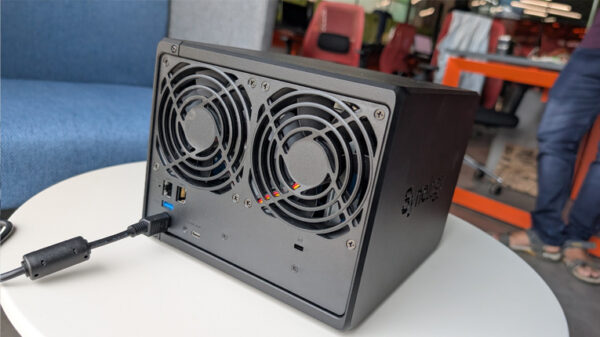
Power efficiency and thermal management have been excellent. Even with constant file transfers and NVMe caching, temperatures have remained within reason, though adding small heatsinks on the SSDs helped. The DS925+ also scales beautifully. With link aggregation enabled, throughput has improved noticeably for our editors who need simultaneous high-speed access. Even when three or four people are pushing large files at once, performance doesn’t dip. For a small creative team, that’s a huge productivity gain.