



Close Menu

    Subscribe to Updates

    Get the latest creative news from FooBar about art, design and business.

    What's Hot

    Samsung Galaxy Z Fold8 Review: Brilliant Foldable, But Samsung Still Cut Corners

    September 5, 2026

    DailyObjects Goes Global, Debuts at IFA Berlin 2026

    September 5, 2026

    Infinix HOT 70 Pro Launched in India With Dynamic Shine Design, Pre-Orders Now Open

    September 5, 2026
    Facebook X (Twitter) Instagram YouTube
    • Subscribe to the Magazine
    • Join our Newsletter
    • BBC TopGear India
    • Influencer News
    Monday, September 7
    Facebook X (Twitter) Instagram Pinterest YouTube Tumblr LinkedIn
    Exhibit TechExhibit Tech
    • Home
    • Tech & AI
      • Tech News
      • Tech Launches
      • Tech Features
      • Gaming
      • AI & Robotics
      • Social Media
      • Crypto
      • Space
      • Software & Apps
    • Reviews
      • Smartphone Reviews
      • Smartwatch Reviews
      • Headphone Reviews
      • Laptop Reviews
      • Tablet Reviews
      • Earbud Reviews
      • Camera
      • Speakers
      • PC components
      • Accessories
      • Best TV Reviews in India – Find Your Next Screen with Exhibit.tech
      • Compare the Best Gadgets in India – Smartphones, Laptops, Wearables & More
      • Best Gadget to use
    • Auto
      • Auto News & Reviews
      • Auto Tech
      • Vehicles
        • Cars
        • Bikes
    • Lifestyle
      • Travel
      • Entertainment
        • Fashion
        • Sports
        • OTT
        • Music
        • Movies
      • Watches
      • Health
      • Sneakerhead
      • Lifestyle Features
    • Guides
      • Explained
      • How To’s
      • How Big Is
      • Tips and Tricks
      • Business Stories
      • Deals and Offer
    • Interviews
      • Creators
      • Tech Titans
      • Tech Talks
      • Celebrities
      • Top 100 Leaders
        • Tech & Auto 2025
      • Petrol Head
      • Marketing Minds
      • Editor’s note
    • Events
      • Influencex Awards
        • InfluencEX Awards Winners 2025
        • InfluencEX Awards Winners 2024
        • InfluencEX Awards Winners 2023
      • Exhibit Tech Awards
        • Tech Awards Winners 2025
        • Tech Awards Winners 2024
        • Tech Awards Winners 2023
      • Tech Fashion Tour
      • TopGear India Awards
    • Indisciplined Leaders
    Exhibit TechExhibit Tech
    Home >> Tips and Tricks >> How to Enable Parental Controls in iOS 18 and iPadOS 18?
    Tips and Tricks

    How to Enable Parental Controls in iOS 18 and iPadOS 18?

    By Sandesh BhosleDecember 27, 20244 Mins Read
    Facebook Twitter Pinterest LinkedIn Tumblr Email
    iOS 18
    Share
    Facebook Twitter LinkedIn Pinterest Email

    Apple has thoughtfully designed parental controls in iOS 18 and iPadOS 18 to help parents manage and restrict content and behaviour on their children’s devices. Leveraging features like Screen Time and Content & Privacy Restrictions, you can ensure that your child uses their device responsibly while enjoying the perks of modern technology. Let’s get into how you can make the most of these features to safeguard your child’s digital experience.

    Understanding Screen Time

    Introduced in iOS 12, Screen Time is the heart of Apple’s parental control system. It not only tracks the time spent on apps but also monitors notifications and helps you enforce limits on specific app categories, gaming, or social media. It’s an essential tool for keeping tabs on your child’s digital habits.

    Parents can also use Screen Time to set boundaries on app downloads, purchases, and access to explicit content. Coupled with Family Sharing, these controls can be managed directly from your device, giving you peace of mind while your child enjoys their iPhone or iPad.

    Enabling Content & Privacy Restrictions

    Before enabling restrictions, ensure both your device and your child’s device are updated to the latest iOS or iPadOS version. Here’s how to activate these settings:

    1. Open Settings.
    2. Tap Screen Time.
    3. Under Family, select your child’s name.
    4. Tap Content & Privacy Restrictions and enter your Screen Time passcode if prompted.
    5. Toggle on Content & Privacy Restrictions.

    For families using Family Sharing, the process is identical. The family organiser can activate the feature through the Settings > Screen Time section on their device.

    Customising Screen Time Limits

    Screen Time allows you to set detailed limits to manage your child’s screen usage effectively. Follow these steps:

    1. Open Settings and tap Screen Time.
    2. Scroll down to the setting you want to adjust:
      • Downtime: Schedule screen-free periods.
      • App Limits: Restrict time on specific apps or app categories like social media or games.
      • Always Allowed: Specify essential apps (e.g., Phone) that remain accessible regardless of limits.
      • Screen Distance: A Face ID-enabled feature ensuring safe viewing distances.

    Setting reasonable screen time boundaries fosters healthy habits and prevents overexposure to screens.

    Disabling Built-In Apps and Features
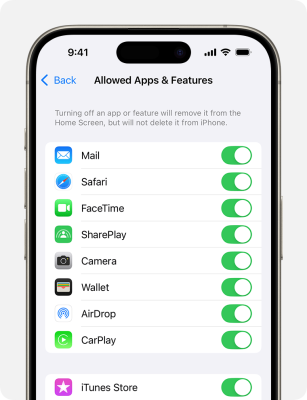
    Disabling Built-In Apps and Features

    For younger children, disabling certain features can create a safer digital environment. Apps like Wallet, Camera, and FaceTime can be toggled off with ease:

    1. Open Settings.
    2. Tap Screen Time > Content & Privacy Restrictions.
    3. Select Allowed Apps & Features.
    4. Toggle off apps you wish to restrict.

    This ensures your child doesn’t access features beyond their maturity level.

    Preventing In-App Purchases

    Avoid unexpected bills by restricting in-app purchases. Here’s how:

    1. Open Settings.
    2. Tap Screen Time > Content & Privacy Restrictions.
    3. Select iTunes & App Store Purchases.
    4. Choose a setting and set it to Don’t Allow.

    These steps ensure you never encounter unwanted surprises on your credit card statement.

    Restricting Gaming Features
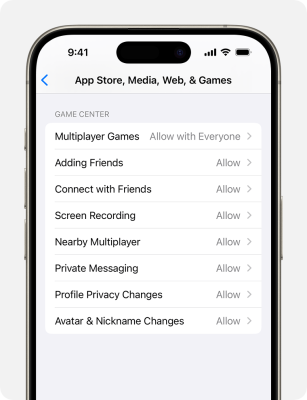
    Restricting Gaming Features

    Mobile gaming is fun, but it’s crucial to set boundaries on interactions like multiplayer gaming or private messaging. These settings apply to games using Game Center features:

    1. Open Settings.
    2. Tap Screen Time > Content & Privacy Restrictions.
    3. Navigate to App Store, Media, Web, & Games > Game Center.
    4. Configure restrictions like disabling multiplayer games or limiting messaging.

    This ensures your child enjoys gaming in a safe and controlled environment.

    Filtering Explicit Content

    Shielding young users from explicit material is vital. Apple’s controls allow you to restrict access to inappropriate music, TV shows, books, and more:
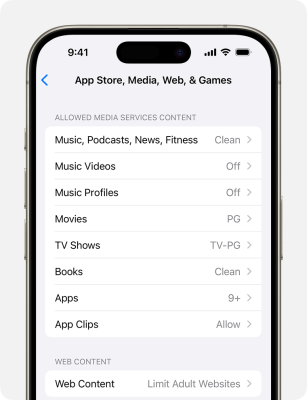
    Filtering Explicit Content

    1. Open Settings.
    2. Tap Screen Time > Content & Privacy Restrictions.
    3. Under App Store, Media, Web, & Games, set restrictions for each category.

    For web content, you can block adult sites, create approved site lists, or limit access to only pre-approved websites.

    Managing Apple Intelligence and Siri Features

    Apple Intelligence and Siri have advanced features powered by machine learning. Parents can disable certain functionalities to limit access to unfiltered content:

    1. Open Settings.
    2. Tap Screen Time > Content & Privacy Restrictions.
    3. Go to Intelligence & Siri.
    4. Toggle off features as needed.

    This helps ensure your child’s interaction with Siri and Apple’s AI remains appropriate for their age. Apple’s parental controls in iOS and iPadOS provide an essential framework for safeguarding children’s digital experiences. By enabling Content & Privacy Restrictions, parents can fine-tune app usage, set screen time limits, and restrict inappropriate content with just a few taps. These tools foster a healthy balance between screen time and offline activities while ensuring kids enjoy technology responsibly.

    apple
    Share. Facebook Twitter Pinterest LinkedIn Tumblr Email

    Related Posts

    Who Is John Ternus? Apple’s New CEO

    September 1, 2026

    Apple Confirms September 9 iPhone Launch Event: Here’s What to Expect

    August 29, 2026

    Apple Mac Mini M6 and Mac Mini M5 Pro Launched in India

    August 26, 2026

    Comments are closed.

    Top Posts

    Who Is John Ternus? Apple’s New CEO
    September 1, 2026
    Apple Confirms September 9 iPhone Launch Event: Here’s What to Expect
    August 29, 2026
    Apple Mac Mini M6 and Mac Mini M5 Pro Launched in India
    August 26, 2026
    7 Pro-Level Photography Tricks Pixel 10a Could Do
    May 15, 2026
    Apple releases iOS 26.5 Developer Beta 1 for iPhones: What’s new and how to update
    March 31, 2026
    Exhibit Magazine | August – September 2026
    Stay In Touch
    • Facebook
    • YouTube
    • TikTok
    • Twitter
    • Instagram
    • Pinterest
    • LinkedIn
    • Reddit

    Subscribe to Updates

    Latest Posts
    Smart phones Reviews

    Samsung Galaxy Z Fold8 Review: Brilliant Foldable, But Samsung Still Cut Corners

    Smart phones Reviews By Ramesh SomaniSeptember 5, 2026
    Tech News

    DailyObjects Goes Global, Debuts at IFA Berlin 2026

    Tech News By Exhibit StaffSeptember 5, 2026
    Tech Launches

    Infinix HOT 70 Pro Launched in India With Dynamic Shine Design, Pre-Orders Now Open

    Tech Launches By Exhibit StaffSeptember 5, 2026

    Exhibit.Tech, we’re your one-stop destination for everything tech! Whether it’s breaking news about the latest launches from giants like Sony, Vivo, Apple, Huawei, OnePlus, Sennheiser, Poco, and more, or in-depth reviews of mobiles, smartwatches, headphones, TVs, and earbuds – we’ve got you covered.

    Our reviews go beyond the surface, highlighting the pros and cons to help you make informed buying decisions. We’re here to simplify your tech journey with practical tips, tricks, and comprehensive “how-to” guides across a wide range of topics.

    Think of us as your friendly tech companion, helping you stay updated and make sense of the ever-evolving tech world with clarity and ease. At Exhibit.Tech, we make tech work for you!

    Most Popular

    OpenAI Brings ChatGPT Ads to Free and Go Users in India, 50 Brands Already on Board

    August 28, 202621 Views

    From Consumers to Creators: Inside India’s Quest for an Indigenous AI Cloud

    August 15, 202612 Views

    How Vormetric Protects Your Data: An Overview Of Key Features

    September 5, 202456 Views
    Our Pick

    Pulkit Samrat – Human in the Age of AI

    August 8, 2026

    Building What Matters: boltt Founder Arnav Kishore on Company’s Smartphone Ambitions

    August 3, 2026

    “Consumers Want AI-Ready Laptops”: Dell’s Anurag Arora Talks XPS, Alienware and More

    July 29, 2026
    Facebook X (Twitter) Instagram Pinterest YouTube
    • About Us
    • Careers
    • Contact Us
    © 2026 Exhibit Technologies | All Rights Reserved

    Type above and press Enter to search. Press Esc to cancel.