

Close Menu

    Subscribe to Updates

    Get the latest creative news from FooBar about art, design and business.

    What's Hot

    Brave Ark Review: Brave Enough for Any Challenge

    March 24, 2026

    One Week with the Apple MacBook Neo

    March 24, 2026

    King Seiko VANAC Titanium Models Unveiled With Bold Design and Lightweight Build

    March 24, 2026
    Facebook X (Twitter) Instagram YouTube
    • Subscribe to the Magazine
    • Join our Newsletter
    • BBC TopGear India
    • Influencer News
    Tuesday, March 24
    Facebook X (Twitter) Instagram Pinterest YouTube Tumblr LinkedIn
    Exhibit TechExhibit Tech
    • Home
    • Tech & AI
      • Tech News
      • Tech Launches
      • Tech Features
      • Gaming
      • AI & Robotics
      • Social Media
      • Cybersecurity
      • FinTech
      • Crypto
      • Space
      • Software & Apps
    • Reviews
      • Smartphone Reviews
      • Smartwatch Reviews
      • Headphone Reviews
      • Laptop Reviews
      • Tablet Reviews
      • Earbud Reviews
      • Camera
      • Speakers
      • PC components
      • Accessories
      • Best TV Reviews in India – Find Your Next Screen with Exhibit.tech
      • Compare the Best Gadgets in India – Smartphones, Laptops, Wearables & More
      • Best Gadget to use
    • Auto
      • Auto News
      • Auto Reviews
      • Auto Tech
      • Vehicles
        • Cars
        • Bikes
    • Lifestyle
      • Travel
      • Entertainment
        • Fashion
        • Sports
        • OTT
        • Music
        • Movies
      • Watches
      • Health
      • Sneakerhead
      • Lifestyle Features
    • Guides
      • Explained
      • How To’s
      • How Big Is
      • Tips and Tricks
      • Screw Ups
    • Interviews
      • Creators
      • Tech Talks
      • Celebrities
      • Top 100 Leaders
        • Tech & Auto 2025
      • Founder’s club
      • Petrol Head
      • Marketing Minds
      • Editor’s note
    • Events
      • Influencex Awards
        • InfluencEX Awards Winners 2025
        • InfluencEX Awards Winners 2024
        • InfluencEX Awards Winners 2023
      • Exhibit Tech Awards
        • Tech Awards Winners 2025
        • Tech Awards Winners 2024
        • Tech Awards Winners 2023
      • Tech Fashion Tour
      • TopGear India Awards
    • Deals and Offer
    Exhibit TechExhibit Tech
    Home >> Tips and Tricks >> Turn Your MacBook into a Digital Weighing Scale with TrackWeight
    Tips and Tricks

    Turn Your MacBook into a Digital Weighing Scale with TrackWeight

    By Aadithya HarishJuly 28, 20253 Mins Read
    Facebook Twitter Pinterest LinkedIn Tumblr Email
    Your MacBook Trackpad Can Now Measure Weights
    Share
    Facebook Twitter LinkedIn Pinterest Email

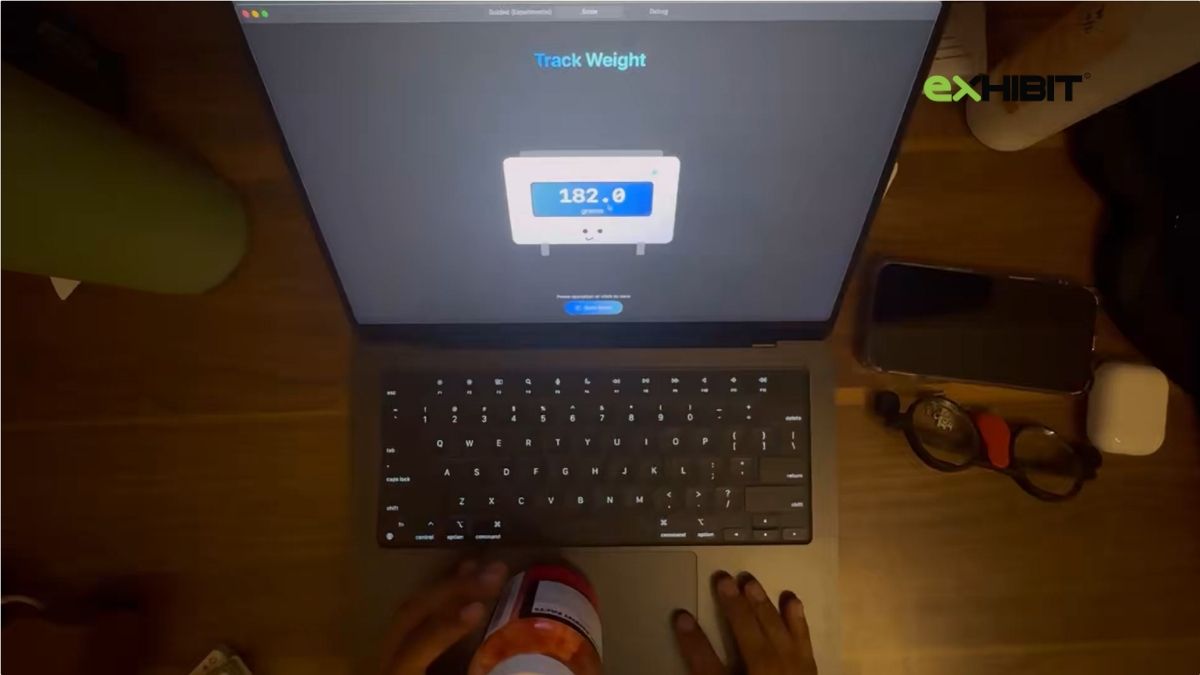
    Yes, your MacBook can now weigh things no joke. Thanks to a new macOS app called TrackWeight, you can transform your MacBook’s Force Touch trackpad into a surprisingly accurate digital weighing scale. Created by Canadian developer Krish Shah, the app uses Apple’s built-in pressure-sensitive technology to weigh small objects without any external hardware.

    How It Works

    Using TrackWeight is simple. Place your finger on the trackpad and then gently rest a lightweight object on it. The app reads the pressure data and converts it directly into grams. Your finger needs to stay in contact with the pad, as the sensor relies on capacitance to function correctly.

    This clever tool works only on Force Touch-enabled MacBooks from 2015 or later and runs locally on the device.

    The Tech Behind TrackWeight

    TrackWeight is powered by Open Multi-Touch Support, a macOS library created by developer Takuto Nakamura. This library allows access to low-level touch sensor data, including pressure, angle, and touch position data typically hidden by Apple’s APIs.

    Shah’s app taps into this data stream and uses it to measure force and convert it to weight. Calibration was straightforward: he placed his MacBook on a standard scale, added small items while pressing the trackpad, and compared the readings. Since macOS already labels some pressure values in grams, no conversion was necessary. According to Shah, the app can handle weights up to 3.5 kilograms with decent accuracy.

    Real-World Testing

    In a series of demo videos on X (formerly Twitter), Shah showcased his experiments by comparing TrackWeight’s output with a regular scale’s display. The results? Surprisingly close. He describes the Force Touch trackpad as essentially a pressure pad with haptic feedback, making it ideal for experimental applications like this.

    Know the Limitations

    TrackWeight is experimental and not meant to replace commercial digital scales. Here are a few caveats:

    • Your finger must stay on the trackpad for accurate readings.
    • Metal objects can give false results unless placed over paper or cloth.
    • The small size of the trackpad limits the types and sizes of items you can weigh.
    • Placing very heavy objects on the trackpad may damage your MacBook. 

    How to Get TrackWeight

    TrackWeight is open-source, licensed under MIT, and available on GitHub. To use it:

    • You need macOS 13 or later.
    • Your MacBook must support Force Touch.
    • You’ll need Xcode to build and run the app.
    • App Sandbox must be disabled due to the app’s need for low-level system access. 

    TrackWeight is for educational and demonstration purposes only, not for critical or professional weighing tasks.

    apple MacBook
    Share. Facebook Twitter Pinterest LinkedIn Tumblr Email

    Related Posts

    iPhone 17e Might Be the Upgrade You’re Actually Looking For in 2026

    March 23, 2026

    Apple’s Silent Security Upgrade Is Here for iPhone iPad and Mac Users

    March 19, 2026

    Whoop vs Apple Watch Ultra 3 vs Galaxy Watch Ultra (2025): What Really Knows Your Body Best?

    March 7, 2026

    1 Comment

    1. Pingback: Redmi Note 14 SE 5G Launched in India With 50MP Camera

    Top Posts

    iPhone 17e Might Be the Upgrade You’re Actually Looking For in 2026
    March 23, 20269 Views
    Apple’s Silent Security Upgrade Is Here for iPhone iPad and Mac Users
    March 19, 202610 Views
    Whoop vs Apple Watch Ultra 3 vs Galaxy Watch Ultra (2025): What Really Knows Your Body Best?
    March 7, 202630 Views
    Apple Introduces MacBook Neo: Affordable Innovation in Laptop Design
    March 4, 202629 Views
    Apple Releases iOS 26.4 Public Beta With AI Playlists, Video Podcasts and RCS Encryption: Full Feature List
    February 18, 202620K Views
    Exhibit Magazine | February – March 2026
    Stay In Touch
    • Facebook
    • YouTube
    • TikTok
    • Twitter
    • Instagram
    • Pinterest
    • LinkedIn
    • Reddit

    Subscribe to Updates

    Latest Posts
    Gadget Reviews

    Brave Ark Review: Brave Enough for Any Challenge

    Gadget Reviews By Shintu DhangMarch 24, 2026
    Laptops Reviews

    One Week with the Apple MacBook Neo

    Laptops Reviews By Shintu DhangMarch 24, 2026
    Watches

    King Seiko VANAC Titanium Models Unveiled With Bold Design and Lightweight Build

    Watches By Aadithya HarishMarch 24, 2026

    Exhibit.Tech, we’re your one-stop destination for everything tech! Whether it’s breaking news about the latest launches from giants like Sony, Vivo, Apple, Huawei, OnePlus, Sennheiser, Poco, and more, or in-depth reviews of mobiles, smartwatches, headphones, TVs, and earbuds – we’ve got you covered.

    Our reviews go beyond the surface, highlighting the pros and cons to help you make informed buying decisions. We’re here to simplify your tech journey with practical tips, tricks, and comprehensive “how-to” guides across a wide range of topics.

    Think of us as your friendly tech companion, helping you stay updated and make sense of the ever-evolving tech world with clarity and ease. At Exhibit.Tech, we make tech work for you!

    Most Popular

    Canva’s New Magic Layers Feature Turns AI Images Into Fully Editable Designs

    March 13, 202631 Views

    ChatGPT Just Got a Major Learning Upgrade: Math and Science Now Come Alive With Interactive Visuals

    March 11, 202618 Views

    Microsoft 365 Introduces Copilot Cowork: AI That Can Plan and Execute Work Tasks

    March 11, 202626 Views
    Our Pick

    Instagram to Kill Encrypted DMs After May 8: Here’s What It Means for Your Chats

    March 17, 2026

    Inside Samsung’s AI Vision: A Conversation with JB Park and Won-Joon Choi in San Francisco

    March 16, 2026

    YouTube’s New 30-Second Non-Skippable TV Ads Could Change How You Watch Videos

    March 14, 2026
    Facebook X (Twitter) Instagram Pinterest YouTube
    • About Us
    • Careers
    • Contact Us
    © 2026 Exhibit Technologies | All Rights Reserved

    Type above and press Enter to search. Press Esc to cancel.