

Close Menu

    Subscribe to Updates

    Get the latest creative news from FooBar about art, design and business.

    What's Hot

    Devialet Launched Phantom Ultimate Speaker

    January 31, 2026
    8.0

    Moto Watch Review: Good Enough for Serious Fitness Tracking?

    January 31, 2026

    Srinjoy Das, Associate Director of Product and Marketing, KRAFTON Inc. – CMO Special

    January 31, 2026
    Facebook X (Twitter) Instagram YouTube
    • Subscribe to the Magazine
    • Join our Newsletter
    • BBC TopGear India
    • Influencer News
    Sunday, February 1
    Facebook X (Twitter) Instagram Pinterest YouTube Tumblr LinkedIn
    Exhibit TechExhibit Tech
    • Home
    • Tech & AI
      • Tech News
      • Tech Launches
      • Tech Features
      • Gaming
      • AI & Robotics
      • Social Media
      • Cybersecurity
      • FinTech
      • Crypto
      • Space
      • Software & Apps
    • Reviews
      • Smartphone Reviews
      • Smartwatch Reviews
      • Headphone Reviews
      • Laptop Reviews
      • Tablet Reviews
      • Earbud Reviews
      • Camera
      • Speakers
      • PC components
      • Accessories
      • Best TV Reviews in India – Find Your Next Screen with Exhibit.tech
      • Compare the Best Gadgets in India – Smartphones, Laptops, Wearables & More
      • Best Gadget to use
    • Auto
      • Auto News
      • Auto Reviews
      • Auto Tech
      • Vehicles
        • Cars
        • Bikes
    • Lifestyle
      • Travel
      • Entertainment
        • Fashion
        • Sports
        • OTT
        • Music
        • Movies
      • Watches
      • Health
      • Sneakerhead
      • Lifestyle Features
    • Guides
      • Explained
      • How To’s
      • How Big Is
      • Tips and Tricks
      • Screw Ups
    • Interviews
      • Creators
      • Tech Talks
      • Celebrities
      • Top 100 Leaders
        • Tech & Auto 2025
      • Founder’s club
      • Petrol Head
      • Marketing Minds
      • Editor’s note
    • Events
      • Influencex Awards
        • InfluencEX Awards Winners 2025
        • InfluencEX Awards Winners 2024
        • InfluencEX Awards Winners 2023
      • Exhibit Tech Awards
        • Tech Awards Winners 2025
        • Tech Awards Winners 2024
        • Tech Awards Winners 2023
      • Tech Fashion Tour
      • TopGear India Awards
    • Deals and Offer
    Exhibit TechExhibit Tech
    Home >> How To's >> How to Reset Your PC Without Losing Important Files
    How To's

    How to Reset Your PC Without Losing Important Files

    By Shintu DhangJuly 31, 20254 Mins Read
    Facebook Twitter Pinterest LinkedIn Tumblr Email
    Share
    Facebook Twitter LinkedIn Pinterest Email

    Resetting your PC can resolve performance issues, clear out clutter, or prepare it for a fresh start. However, the fear of losing important files often makes us hesitant. Fortunately, modern operating systems like Windows 10 and 11 offer options to reset your PC while preserving personal files. Here’s a step-by-step guide to resetting your PC without losing what matters most, tailored for Windows users.

    Step 1: Back Up Your Files

    Although Windows offers options to preserve your files during a reset, creating a backup is a prudent first step. Use an external hard drive, USB flash drive, or cloud storage services like OneDrive or Google Drive to save critical documents, photos, videos, and other personal data. To back up on Windows, go to Settings > Update & Security > Backup, and select “Back up using File History” to save files to an external drive.

    Alternatively, manually copy important folders to your chosen storage. This ensures your data is safe in case something goes wrong during the reset process.=

    Step 2: Choose the Right Reset Option
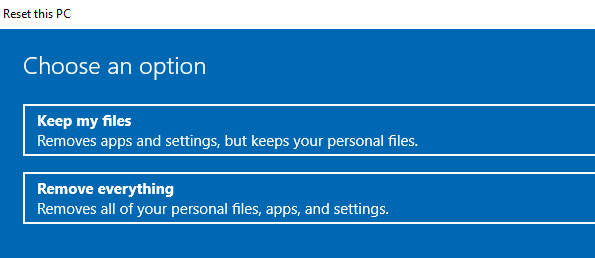
    Windows offers a “Reset this PC” feature that allows you to keep personal files while removing apps and settings. To access it, go to Settings > System > Recovery (or Update & Security > Recovery in Windows 10). Under “Reset this PC,” click “Get started.” You’ll see two options:

    • Keep my files: This option removes apps and settings, but preserves personal files in folders such as Documents, Pictures, and Desktop.
    • Remove everything: This wipes all data, including personal files, for a complete reset. Choose “Keep my files” to protect your data.

    Also Read: How to Free Up Space on Android?

    Step 3: Select Reset Preferences

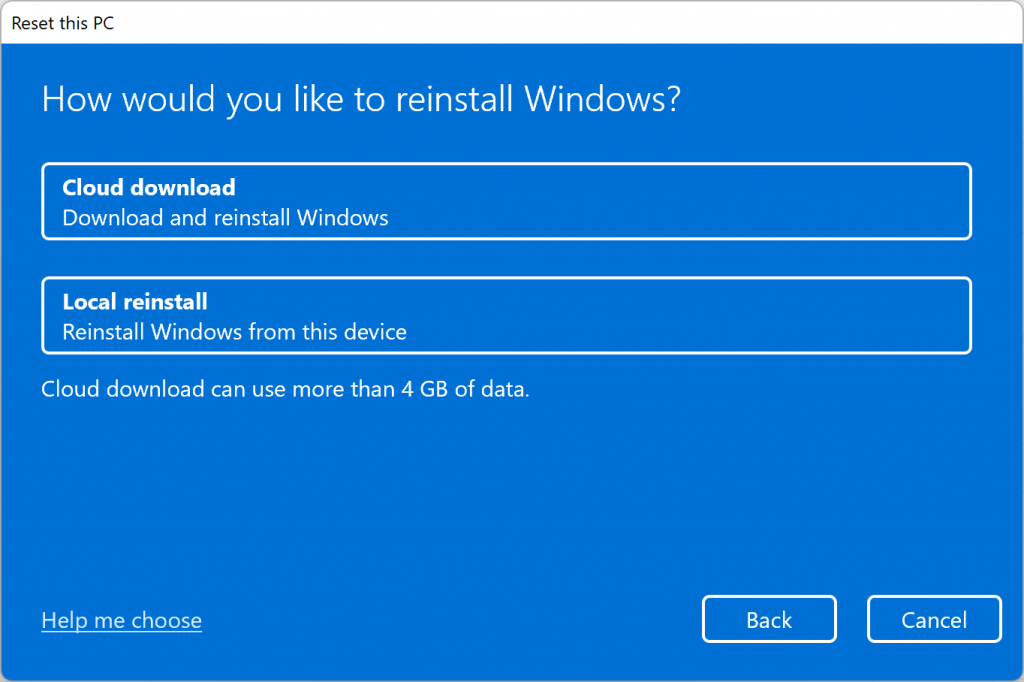
    After choosing “Keep my files,” decide how Windows should handle the reinstallation:

    • Cloud download: Downloads a fresh copy of Windows from Microsoft’s servers. This requires a stable internet connection and may take longer, but it ensures you have the latest version.
    • Local reinstall: Uses the existing Windows installation on your PC. This is faster and doesn’t require an internet connection, but you may still experience some system issues. Select the option that suits your needs.

    Step 4: Execute the Reset

    Follow the on-screen prompts to confirm your choices. The process may take anywhere from 30 minutes to a few hours, depending on your PC’s speed and the chosen reset method. Your PC will restart multiple times, and once complete, you’ll have a fresh Windows installation with your personal files intact.
    Step 5: Restore and Reinstall

    After the reset, your files should remain in their original folders. Verify their presence and restore any additional data from your backup if needed. You’ll need to reinstall apps, as the reset removes them. Download essential software from trusted sources and update drivers via Device Manager or the manufacturer’s website.

    Also read: Think iOS 18.6 Fixed Everything? Not Until You Do This

    Final Tips

    Before resetting, ensure you have admin access and a stable power source to avoid interruptions. If you’re unsure about specific files, consult Microsoft’s support page or seek the advice of a professional. Resetting your PC while keeping files is straightforward with these steps, offering a balance of system refresh and data preservation.

    Can I reset my PC without losing my personal files?
    Yes, Windows 10 and 11 offer a “Keep my files” option under “Reset this PC” that preserves personal files while removing apps and settings.
    Should I back up my files before resetting?
    Yes, even if you choose “Keep my files,” it’s strongly recommended to back up important data to an external drive or cloud storage in case anything goes wrong.
    What’s the difference between “Cloud download” and “Local reinstall”?
    “Cloud download” gets the latest Windows version from Microsoft servers and may take longer. “Local reinstall” uses existing system files on your PC and is faster but may retain some issues.
    Will my apps be removed during the reset?
    Yes, all third-party apps and software will be removed during the reset. You’ll need to reinstall them afterward.
    Where can I find the reset option in Windows?
    Go to Settings > System > Recovery (or Update & Security > Recovery in Windows 10), and click “Get started” under “Reset this PC.”
    How long does the reset process take?
    The reset can take 30 minutes to a few hours depending on your PC’s hardware and whether you choose cloud or local reinstall.
    Do I need an internet connection for resetting?
    Only if you choose “Cloud download” for reinstalling Windows. “Local reinstall” does not require internet access.
    Share. Facebook Twitter Pinterest LinkedIn Tumblr Email

    Related Posts

    Google Rolls Out Power Saving Mode for Maps on Pixel 10 Series: Here’s How It Works

    November 29, 2025

    How to Navigate Your iPhone with Your Eyes

    November 17, 2025

    How to Hide Your Likes on Instagram Reels

    November 15, 2025

    1 Comment

    1. Pingback: Before You Sell Your Device, Do THIS First!

    Top Posts

    Google Rolls Out Power Saving Mode for Maps on Pixel 10 Series: Here’s How It Works
    November 29, 2025
    How to Navigate Your iPhone with Your Eyes
    November 17, 2025
    How to Hide Your Likes on Instagram Reels
    November 15, 2025
    YouTube introduces Gemini-powered ‘Ask’ feature for PC and smartphone: Here’s how it works
    November 12, 2025
    How to Restore Old Photos Using Google Gemini AI: Easy Prompts, Tips & More
    November 12, 2025
    Exhibit Magazine | January 2026
    Stay In Touch
    • Facebook
    • YouTube
    • TikTok
    • Twitter
    • Instagram
    • Pinterest
    • LinkedIn
    • Reddit

    Subscribe to Updates

    Latest Posts
    Tech Launches

    Devialet Launched Phantom Ultimate Speaker

    Tech Launches By Shintu DhangJanuary 31, 2026
    Gadget Reviews

    Moto Watch Review: Good Enough for Serious Fitness Tracking?

    8.0 Gadget Reviews By Sohil NikamJanuary 31, 2026
    Interviews

    Srinjoy Das, Associate Director of Product and Marketing, KRAFTON Inc. – CMO Special

    Interviews By Aadithya HarishJanuary 31, 2026

    Exhibit.Tech, we’re your one-stop destination for everything tech! Whether it’s breaking news about the latest launches from giants like Sony, Vivo, Apple, Huawei, OnePlus, Sennheiser, Poco, and more, or in-depth reviews of mobiles, smartwatches, headphones, TVs, and earbuds – we’ve got you covered.

    Our reviews go beyond the surface, highlighting the pros and cons to help you make informed buying decisions. We’re here to simplify your tech journey with practical tips, tricks, and comprehensive “how-to” guides across a wide range of topics.

    Think of us as your friendly tech companion, helping you stay updated and make sense of the ever-evolving tech world with clarity and ease. At Exhibit.Tech, we make tech work for you!

    Most Popular

    OpenAI Introduces ChatGPT Translate and It Does More Than Google Translate

    January 16, 2026

    Alexa Plus Comes to the Web and Amazon Is Rethinking AI Assistants

    January 7, 2026

    OpenAI’s First Hardware Could Ditch Screens and Rely Fully on Voice

    January 6, 2026
    Our Pick

    Lakshmi Narayanan B, CMO, CEAT – CMO Special

    January 31, 2026

    Bruce Lin, NB Marketing Manager of South Asia, MSI – CMO Special

    January 31, 2026

    Sumit Sonal, Head of Marketing, Qualcomm India – CMO Special

    January 31, 2026
    Facebook X (Twitter) Instagram Pinterest YouTube
    • About Us
    • Careers
    • Contact Us
    © 2026 Exhibit Technologies | All Rights Reserved

    Type above and press Enter to search. Press Esc to cancel.