

Close Menu

    Subscribe to Updates

    Get the latest creative news from FooBar about art, design and business.

    What's Hot

    How to Set Up Apple Pay in India

    October 8, 2026

    Samsung Week 2026: Discounts of Up to 60% Across Samsung’s Product Range

    October 8, 2026

    Air India and Tata Communications Launch EasyRoam Travel SIM

    October 8, 2026
    Facebook X (Twitter) Instagram YouTube
    • Subscribe to the Magazine
    • Join our Newsletter
    • BBC TopGear India
    • Influencer News
    Thursday, October 8
    Facebook X (Twitter) Instagram Pinterest YouTube Tumblr LinkedIn
    Exhibit TechExhibit Tech
    • Home
    • Tech & AI
      • Tech News
      • Tech Launches
      • Tech Features
      • Gaming
      • AI & Robotics
      • Social Media
      • Crypto
      • Space
      • Software & Apps
    • Reviews
      • Smartphone Reviews
      • Smartwatch Reviews
      • Headphone Reviews
      • Laptop Reviews
      • Tablet Reviews
      • Earbud Reviews
      • Camera
      • Speakers
      • PC components
      • Accessories
      • Best TV Reviews in India – Find Your Next Screen with Exhibit.tech
      • Compare the Best Gadgets in India – Smartphones, Laptops, Wearables & More
      • Best Gadget to use
    • Auto
      • Auto News & Reviews
      • Auto Tech
      • Vehicles
        • Cars
        • Bikes
    • Lifestyle
      • Travel
      • Entertainment
        • Fashion
        • Sports
        • OTT
        • Music
        • Movies
      • Watches
      • Health
      • Sneakerhead
      • Lifestyle Features
    • Guides
      • Explained
      • How To’s
      • How Big Is
      • Tips and Tricks
      • Business Stories
      • Deals and Offer
    • Interviews
      • Creators
      • Tech Titans
      • Tech Talks
      • Celebrities
      • Top 100 Leaders
        • Tech & Auto 2025
      • Petrol Head
      • Marketing Minds
      • Editor’s note
    • Events
      • Influencex Awards
        • InfluencEX Awards Winners 2025
        • InfluencEX Awards Winners 2024
        • InfluencEX Awards Winners 2023
      • Exhibit Tech Awards
        • Tech Awards Winners 2025
        • Tech Awards Winners 2024
        • Tech Awards Winners 2023
      • Tech Fashion Tour
      • TopGear India Awards
    • Indisciplined Leaders
    Exhibit TechExhibit Tech
    Home >> How To's >> How to Set Up Apple Pay in India
    How To's

    How to Set Up Apple Pay in India

    By Shintu DhangOctober 8, 20262 Mins Read
    Facebook Twitter Pinterest LinkedIn Tumblr Email
    Share
    Facebook Twitter LinkedIn Pinterest Email

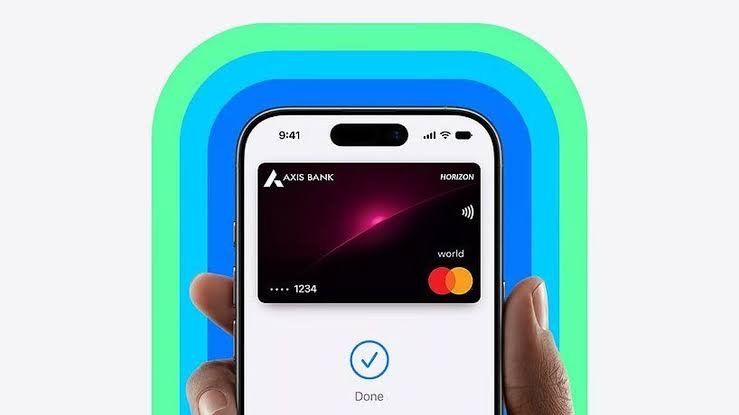
    After a 12-year wait since its original US debut, Apple has officially launched its contactless digital payment service, Apple Pay, in India. In partnership with Axis Bank, the service allows Indian users to leave their physical wallets behind and make seamless, secure payments directly from their Apple devices.

    Using Near Field Communication (NFC) technology, Apple Pay lets you tap your iPhone or Apple Watch on compatible point-of-sale (PoS) terminals. Beyond physical retail stores, the service also streamlines in-app purchases and online checkouts on various e-commerce platforms.

    If you are ready to transition to digital tap-to-pay, here is how to get Apple Pay up and running on your iPhone in India.

    What You Need Before Starting

    Apple Pay’s initial rollout in India comes with a few specific hardware and banking requirements. Before attempting to set up the service, ensure you meet the following criteria:

    To use Apple Pay in India, you need:

    1. Compatible Device: An iPhone XR or newer with iOS 18 or later. If using an Apple Watch, it must be a Series 6 or newer with watchOS 11 or later.
    2. Eligible Credit Card: Visa or Mastercard credit cards issued by Axis Bank. Debit cards are not supported.
    3. NFC-Enabled PoS: The retail store must have a card machine that supports NFC contactless payments.

    (Note: Apple plans to add support for other banks like ICICI and HDFC soon.)

    Step-by-Step Setup Guide

    Setting up Apple Pay takes just a couple of minutes. Make sure your Axis Bank credit card is handy and follow these steps:

    1.Open the Wallet App:

    Unlock your compatible iPhone and launch the built-in Wallet app.

    2.Add a New Card:

    Tap the “+” (Plus) sign located at the top right corner of the screen to initiate the setup process.

    3.Select Card Type:

    On the new screen that appears, tap on the Debit or Credit Card option.

    4.Input Card Details:

    Place your iPhone over your Axis Bank credit card so that it fits within the camera frame to scan the numbers automatically. Alternatively, you can tap Enter Card Details Manually and type in your full name, 16-digit card number, expiry date, and security code (CVV).

    5.Verify and Save:

    Tap the Continue button to register the card to your Apple Wallet. Follow any final on-screen instructions or OTP verification prompts from Axis Bank to finalize the activation.

    Share. Facebook Twitter Pinterest LinkedIn Tumblr Email

    Related Posts

    Apple releases iOS 26.5 Developer Beta 1 for iPhones: What’s new and how to update

    March 31, 2026

    Switching Phones? Here’s How to Transfer WhatsApp Chats Between Android and iPhone Without Losing Data

    March 30, 2026

    Google’s New Android Update Lets You Install Any App Safely: Here’s How It Works

    March 23, 2026
    Leave A Reply Cancel Reply

    You must be logged in to post a comment.

    Top Posts

    Apple releases iOS 26.5 Developer Beta 1 for iPhones: What’s new and how to update
    March 31, 2026
    Switching Phones? Here’s How to Transfer WhatsApp Chats Between Android and iPhone Without Losing Data
    March 30, 2026
    Google’s New Android Update Lets You Install Any App Safely: Here’s How It Works
    March 23, 2026
    Instagram Adds AI Voice Effects for DMs: Here’s How You Can Send Voice Notes That Sound Completely Different
    March 18, 2026
    WhatsApp Now Lets Parents Control Pre-Teen Accounts: Here’s How the New Feature Works
    March 12, 2026
    Exhibit Magazine | August – September 2026
    Stay In Touch
    • Facebook
    • YouTube
    • TikTok
    • Twitter
    • Instagram
    • Pinterest
    • LinkedIn
    • Reddit

    Subscribe to Updates

    Latest Posts
    How To's

    How to Set Up Apple Pay in India

    How To's By Shintu DhangOctober 8, 2026
    Tech News

    Samsung Week 2026: Discounts of Up to 60% Across Samsung’s Product Range

    Tech News By Yug SarafOctober 8, 2026
    Tech News

    Air India and Tata Communications Launch EasyRoam Travel SIM

    Tech News By Yug SarafOctober 8, 2026

    Exhibit.Tech, we’re your one-stop destination for everything tech! Whether it’s breaking news about the latest launches from giants like Sony, Vivo, Apple, Huawei, OnePlus, Sennheiser, Poco, and more, or in-depth reviews of mobiles, smartwatches, headphones, TVs, and earbuds – we’ve got you covered.

    Our reviews go beyond the surface, highlighting the pros and cons to help you make informed buying decisions. We’re here to simplify your tech journey with practical tips, tricks, and comprehensive “how-to” guides across a wide range of topics.

    Think of us as your friendly tech companion, helping you stay updated and make sense of the ever-evolving tech world with clarity and ease. At Exhibit.Tech, we make tech work for you!

    Most Popular

    Your Kitchen Bills Are Rising: How Smart Appliances Can Help Indian Households Cut Everyday Expenses

    September 9, 202635 Views

    OpenAI Brings ChatGPT Ads to Free and Go Users in India, 50 Brands Already on Board

    August 28, 202632 Views

    From Consumers to Creators: Inside India’s Quest for an Indigenous AI Cloud

    August 15, 202618 Views
    Our Pick

    Sony India’s Mukesh Srivastava on Why Imaging Is Entering an Exciting New Phase in India

    September 16, 2026

    Instagram Now Lets You Add Tagged Posts to Your Main Grid

    September 15, 2026

    Junichi Izumi: Reimagining G-SHOCK for a New Generation

    September 12, 2026
    Facebook X (Twitter) Instagram Pinterest YouTube
    • About Us
    • Careers
    • Contact Us
    © 2026 Exhibit Technologies | All Rights Reserved

    Type above and press Enter to search. Press Esc to cancel.