


Close Menu

    Subscribe to Updates

    Get the latest creative news from FooBar about art, design and business.

    What's Hot

    vivo Launches V70 FE Smartphone with Advanced Imaging and Design

    April 13, 2026
    8.8

    HyperX Pulsefire Saga Wired Gaming Mouse Review

    April 13, 2026

    Ai+ Smartphone Launches Nova Series and Expands Ecosystem with New Products

    April 10, 2026
    Facebook X (Twitter) Instagram YouTube
    • Subscribe to the Magazine
    • Join our Newsletter
    • BBC TopGear India
    • Influencer News
    Tuesday, April 14
    Facebook X (Twitter) Instagram Pinterest YouTube Tumblr LinkedIn
    Exhibit TechExhibit Tech
    • Home
    • Tech & AI
      • Tech News
      • Tech Launches
      • Tech Features
      • Gaming
      • AI & Robotics
      • Social Media
      • Cybersecurity
      • FinTech
      • Crypto
      • Space
      • Software & Apps
    • Reviews
      • Smartphone Reviews
      • Smartwatch Reviews
      • Headphone Reviews
      • Laptop Reviews
      • Tablet Reviews
      • Earbud Reviews
      • Camera
      • Speakers
      • PC components
      • Accessories
      • Best TV Reviews in India – Find Your Next Screen with Exhibit.tech
      • Compare the Best Gadgets in India – Smartphones, Laptops, Wearables & More
      • Best Gadget to use
    • Auto
      • Auto News
      • Auto Reviews
      • Auto Tech
      • Vehicles
        • Cars
        • Bikes
    • Lifestyle
      • Travel
      • Entertainment
        • Fashion
        • Sports
        • OTT
        • Music
        • Movies
      • Watches
      • Health
      • Sneakerhead
      • Lifestyle Features
    • Guides
      • Explained
      • How To’s
      • How Big Is
      • Tips and Tricks
      • Screw Ups
    • Interviews
      • Creators
      • Tech Talks
      • Celebrities
      • Top 100 Leaders
        • Tech & Auto 2025
      • Founder’s club
      • Petrol Head
      • Marketing Minds
      • Editor’s note
    • Events
      • Influencex Awards
        • InfluencEX Awards Winners 2025
        • InfluencEX Awards Winners 2024
        • InfluencEX Awards Winners 2023
      • Exhibit Tech Awards
        • Tech Awards Winners 2025
        • Tech Awards Winners 2024
        • Tech Awards Winners 2023
      • Tech Fashion Tour
      • TopGear India Awards
    • Deals and Offer
    Exhibit TechExhibit Tech
    Home >> Tech News >> Apple Releases iOS 26.2 Public Beta for iPhones: New Features, Eligible Devices, and How to Install
    Tech News

    Apple Releases iOS 26.2 Public Beta for iPhones: New Features, Eligible Devices, and How to Install

    By Aadithya HarishNovember 7, 20254 Mins Read
    Facebook Twitter Pinterest LinkedIn Tumblr Email
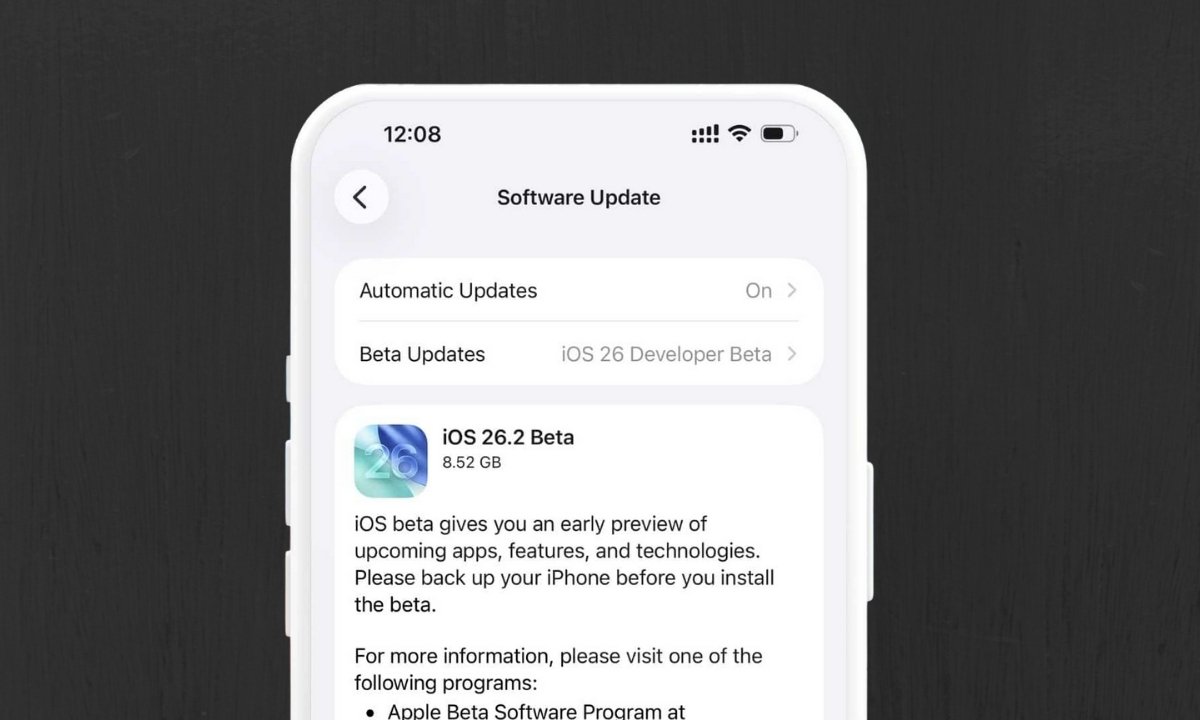
    iOS 26.2 Beta Update
    Share
    Facebook Twitter LinkedIn Pinterest Email

    Apple has officially rolled out the first public beta of iOS 26.2, just a week after releasing the developer beta. The update introduces a host of refinements across the Lock Screen, Health, Reminders, and Podcasts apps along with expanded AirPods Live Translation support for users in the European Union.

    If you’re part of Apple’s Public Beta Program, here’s everything you need to know about iOS 26.2 Public Beta 1, from new features to installation steps.

    What’s New in iOS 26.2 Public Beta 1

    1. Lock Screen Customization

    Apple has added a new Lock Screen slider that lets users fine-tune the Liquid Glass effect. Under the “Glass” option, you can now choose how transparent the clock widget appears from fully clear to frosted. There’s also a “Solid” option that removes the glass-like design completely, giving the clock a more traditional appearance.

    This update brings greater control and personalization to one of iOS’s most visually dynamic features.

    2. Updated Sleep Score in the Health App

    The Health app on iOS 26.2 introduces revised Sleep Score ranges, offering more accurate insights into your sleep quality. Here are the new scoring categories:

    • Very Low: 0–40 (previously 0–29)
    • Low: 41–60 (previously 30–49)
    • OK: 61–80 (previously 50–69)
    • High: 81–95 (previously 70–89)
    • Very High: 96–100 (previously 90–100)

    These updates are also available on watchOS 26.2 for all Apple Watch models and can be viewed directly within the Health app on your iPhone.

    3. Alarms in Reminders App

    The Reminders app now includes an “Urgent” toggle that allows you to set alarms for time-sensitive tasks. When enabled, the reminder will trigger an alarm on your Lock Screen with “Snooze” and “Slide to Stop” options.

    You can also view a countdown timer, mark the reminder as complete, or reschedule it directly making reminders more actionable and efficient than ever.

    4. New Features in the Podcasts App

    Apple has revamped the Podcasts app with three new features aimed at improving navigation and engagement:

    • Auto-generated chapters for quick content navigation.
    • Podcast mentions visible within transcripts and playback screens.
    • Clickable external links from episode descriptions, offering easy access to references mentioned in shows.

    These improvements enhance the overall listening and discovery experience for podcast enthusiasts.

    iOS 26.2 Public Beta 1: Supported iPhone Models

    The latest beta is compatible with the following iPhone models:

    • iPhone 17 Series: iPhone 17, 17 Pro, 17 Pro Max, iPhone Air
    • iPhone 16 Series: iPhone 16, 16 Plus, 16 Pro, 16 Pro Max, 16e
    • iPhone 15 Series: iPhone 15, 15 Plus, 15 Pro, 15 Pro Max
    • iPhone 14 Series: iPhone 14, 14 Plus, 14 Pro, 14 Pro Max
    • iPhone 13 Series: iPhone 13, 13 mini, 13 Pro, 13 Pro Max
    • iPhone 12 Series: iPhone 12, 12 mini, 12 Pro, 12 Pro Max
    • iPhone 11 Series: iPhone 11, 11 Pro, 11 Pro Max
    • iPhone SE (2nd generation and later)

    Also Read: ChatGPT Go Now Free in India for One Year — Here’s How to Get It

    How to Install iOS 26.2 Public Beta

    Follow these steps to install the iOS 26.2 Public Beta on your iPhone:

    1. Sign up for the Apple Beta Software Program at beta.apple.com/sp/betaprogram.
    2. On your iPhone, go to Settings → General → Software Update.
    3. Tap Beta Updates and select iOS 26.2 Public Beta.
    4. Go back to the Software Update page and wait for the beta to appear.
    5. Tap Download and Install, agree to Apple’s terms, and begin the installation.

    Once the installation completes, your iPhone will restart running the latest iOS 26.2 Public Beta.

    Final Thoughts

    The iOS 26.2 Public Beta brings subtle but meaningful improvements to user experience from deeper customization options to smarter app updates. Whether it’s the new Lock Screen effects, enhanced health insights, or podcast navigation upgrades, Apple continues to refine iOS for everyday users.

    If you’re eager to try the latest features before the official release, the public beta is available now for all eligible iPhone models.

    Check out the Latest Tech News

    apple iOS 26
    Share. Facebook Twitter Pinterest LinkedIn Tumblr Email

    Related Posts

    Logitech Launches PRO X2 SUPERSTRIKE Gaming Mouse with New Click Technology

    April 9, 2026

    ViewSonic Launches AI-Powered ViewBoard Interactive Displays in India

    April 7, 2026

    How AI Caught Phone Thieves During an RCB Match: JARVIS Brings Predictive Security to IPL Matches

    April 7, 2026

    2 Comments

    1. Pingback: IOS 26.2 Beta | Lock Screen REVOLUTION!

    2. Pingback: Spotify introduces weekly music recap “Listening Stats”

    Top Posts

    Logitech Launches PRO X2 SUPERSTRIKE Gaming Mouse with New Click Technology
    April 9, 2026
    ViewSonic Launches AI-Powered ViewBoard Interactive Displays in India
    April 7, 2026
    How AI Caught Phone Thieves During an RCB Match: JARVIS Brings Predictive Security to IPL Matches
    April 7, 2026
    Artemis II Successfully Launches, Sending Humans Back Toward the Moon After 50 Years
    April 2, 2026
    Launchpad 2026 Celebrates a Decade of Entrepreneurship at BITS Hyderabad
    March 31, 2026
    Exhibit Magazine | April 2026
    Stay In Touch
    • Facebook
    • YouTube
    • TikTok
    • Twitter
    • Instagram
    • Pinterest
    • LinkedIn
    • Reddit

    Subscribe to Updates

    Latest Posts
    Tech Launches

    vivo Launches V70 FE Smartphone with Advanced Imaging and Design

    Tech Launches By Shintu DhangApril 13, 2026
    Gadget Reviews

    HyperX Pulsefire Saga Wired Gaming Mouse Review

    8.8 Gadget Reviews By Sohil NikamApril 13, 2026
    Tech Launches

    Ai+ Smartphone Launches Nova Series and Expands Ecosystem with New Products

    Tech Launches By Shintu DhangApril 10, 2026

    Exhibit.Tech, we’re your one-stop destination for everything tech! Whether it’s breaking news about the latest launches from giants like Sony, Vivo, Apple, Huawei, OnePlus, Sennheiser, Poco, and more, or in-depth reviews of mobiles, smartwatches, headphones, TVs, and earbuds – we’ve got you covered.

    Our reviews go beyond the surface, highlighting the pros and cons to help you make informed buying decisions. We’re here to simplify your tech journey with practical tips, tricks, and comprehensive “how-to” guides across a wide range of topics.

    Think of us as your friendly tech companion, helping you stay updated and make sense of the ever-evolving tech world with clarity and ease. At Exhibit.Tech, we make tech work for you!

    Most Popular

    Apple Is About to Reinvent Siri Forever A Standalone AI App Could Change Your iPhone Experience

    March 26, 202619 Views

    Canva’s New Magic Layers Feature Turns AI Images Into Fully Editable Designs

    March 13, 202642 Views

    ChatGPT Just Got a Major Learning Upgrade: Math and Science Now Come Alive With Interactive Visuals

    March 11, 202627 Views
    Our Pick

    Instagram to Kill Encrypted DMs After May 8: Here’s What It Means for Your Chats

    March 17, 2026

    Inside Samsung’s AI Vision: A Conversation with JB Park and Won-Joon Choi in San Francisco

    March 16, 2026

    YouTube’s New 30-Second Non-Skippable TV Ads Could Change How You Watch Videos

    March 14, 2026
    Facebook X (Twitter) Instagram Pinterest YouTube
    • About Us
    • Careers
    • Contact Us
    © 2026 Exhibit Technologies | All Rights Reserved

    Type above and press Enter to search. Press Esc to cancel.