

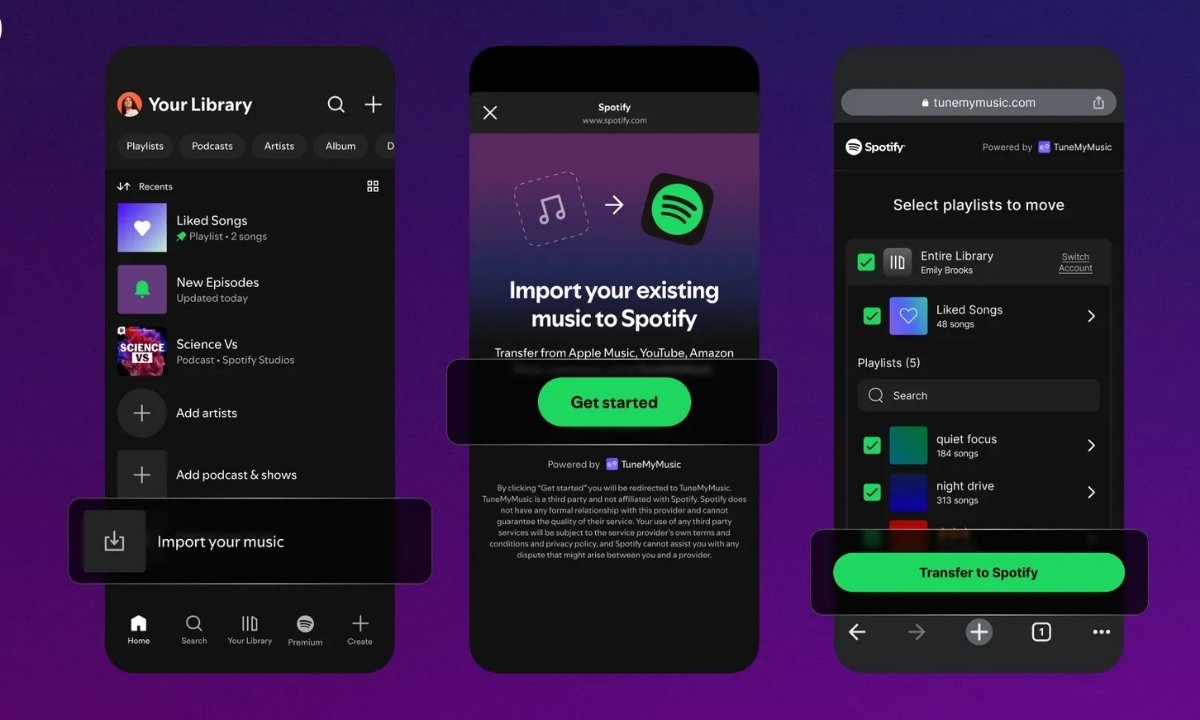
Spotify has launched a new feature called Import your music that allows users to move playlists from other music streaming platforms directly into their Spotify library. The rollout is happening globally and will appear for all mobile users over the next few days. This update makes switching to Spotify much easier because listeners no longer need to recreate their playlists manually.
Spotify explained in its newsroom announcement that the new tool makes it simple to transfer playlists from other services straight into the Spotify library. The feature works in partnership with TuneMyMusic, a service widely used to move playlists across different platforms.
Music Services Supported for Playlist Import
Spotify has not shared an official list of compatible platforms. However, TuneMyMusic confirms support for major music services including Apple Music, YouTube Music, YouTube, Deezer, Tidal, Amazon Music, SoundCloud, Yandex Music, Qobuz, Beatport, Beatsource, iTunes, Napster, Pandora, Anghami, KKBOX, Last.fm, SoundMachine and Boomplay. This ensures that users from nearly every major streaming app can transfer their playlists without any difficulty.
Steps to Import Playlists to Spotify
To bring your playlists into Spotify, open the Spotify app on your mobile device and go to Your Library. Scroll to the bottom and tap on the Import your music option. You will see on screen instructions that guide you through the TuneMyMusic connection process. After connecting, choose the platform you want to move your playlists from and start the transfer. The process is quick and does not require installing any additional applications.
Also Read: WhatsApp to Soon Support Multiple Accounts on the Same iPhone All You Need to Know
Features Available After Importing Playlists
Once your playlists are imported, Spotify allows you to use all its familiar tools. You can turn any imported playlist into a shared playlist, invite friends to collaborate or add your own custom cover art. Features such as playlist transition mixing, Smart Filters and other creative tools also work with imported playlists wherever these features are supported.
Spotify’s recommendation system also learns from the tracks you import. This helps the platform refine personalised playlists such as daylist and Release Radar based on the music you bring from other services, giving you more accurate recommendations from the start.
Conclusion
This new playlist import feature removes one of the biggest challenges users face when shifting from one streaming platform to another. By making the transfer simple and integrating imported music into personalised recommendations, Spotify strengthens its position as a user friendly and convenient music streaming service.