


Close Menu

    Subscribe to Updates

    Get the latest creative news from FooBar about art, design and business.

    What's Hot

    Oakter Mini UPS Fiber: Is this the Best Mini UPS during Power Outages!

    May 4, 2026

    Oben Rorr EVO Breaks Cover with Smart Tech and Real-World Focus

    April 30, 2026

    Royal Enfield Extends Legacy into Apparel with Heritage Collection

    April 29, 2026
    Facebook X (Twitter) Instagram YouTube
    • Subscribe to the Magazine
    • Join our Newsletter
    • BBC TopGear India
    • Influencer News
    Monday, May 4
    Facebook X (Twitter) Instagram Pinterest YouTube Tumblr LinkedIn
    Exhibit TechExhibit Tech
    • Home
    • Tech & AI
      • Tech News
      • Tech Launches
      • Tech Features
      • Gaming
      • AI & Robotics
      • Social Media
      • Cybersecurity
      • FinTech
      • Crypto
      • Space
      • Software & Apps
    • Reviews
      • Smartphone Reviews
      • Smartwatch Reviews
      • Headphone Reviews
      • Laptop Reviews
      • Tablet Reviews
      • Earbud Reviews
      • Camera
      • Speakers
      • PC components
      • Accessories
      • Best TV Reviews in India – Find Your Next Screen with Exhibit.tech
      • Compare the Best Gadgets in India – Smartphones, Laptops, Wearables & More
      • Best Gadget to use
    • Auto
      • Auto News
      • Auto Reviews
      • Auto Tech
      • Vehicles
        • Cars
        • Bikes
    • Lifestyle
      • Travel
      • Entertainment
        • Fashion
        • Sports
        • OTT
        • Music
        • Movies
      • Watches
      • Health
      • Sneakerhead
      • Lifestyle Features
    • Guides
      • Explained
      • How To’s
      • How Big Is
      • Tips and Tricks
      • Screw Ups
    • Interviews
      • Creators
      • Tech Talks
      • Celebrities
      • Top 100 Leaders
        • Tech & Auto 2025
      • Founder’s club
      • Petrol Head
      • Marketing Minds
      • Editor’s note
    • Events
      • Influencex Awards
        • InfluencEX Awards Winners 2025
        • InfluencEX Awards Winners 2024
        • InfluencEX Awards Winners 2023
      • Exhibit Tech Awards
        • Tech Awards Winners 2025
        • Tech Awards Winners 2024
        • Tech Awards Winners 2023
      • Tech Fashion Tour
      • TopGear India Awards
    • Deals and Offer
    Exhibit TechExhibit Tech
    Home >> Tech News >> Windows 11 25H2 Update Rolling Out: What’s New and How to Install
    Tech News

    Windows 11 25H2 Update Rolling Out: What’s New and How to Install

    By Aadithya HarishOctober 4, 20253 Mins Read
    Facebook Twitter Pinterest LinkedIn Tumblr Email
    Windows 11
    Share
    Facebook Twitter LinkedIn Pinterest Email

    Microsoft has officially begun the rollout of the Windows 11 25H2 update, starting September 30, 2025. The new version focuses on AI-powered features, smarter energy usage, improved recovery tools, and a refreshed interface. Unlike previous major updates, this one is delivered as a light enablement package, making installation faster and smoother for most users.

    Faster and Lighter Update

    Devices already running Windows 11 version 24H2 can install the new update quickly because most of the system components are already present. The update simply unlocks these features rather than performing a full reinstall, reducing download size and installation time.

    However, PCs on Windows 10 or Windows 11 23H2 will still go through the standard, lengthier upgrade process.

    How to Install Windows 11 25H2

    Installing the 25H2 update is simple and can be done directly through Windows Update:

    1. Open the Start Menu and go to Settings.
    2. Click Windows Update.
    3. Select Check for updates.
    4. When you see Windows 11, version 25H2, click Download and install now.

    Once the process finishes, restart your computer to complete the installation.

    Also Read: Spotify Now Lets You Block Individual Songs from Affecting Your Recommendations

    Top New Features in Windows 11 25H2

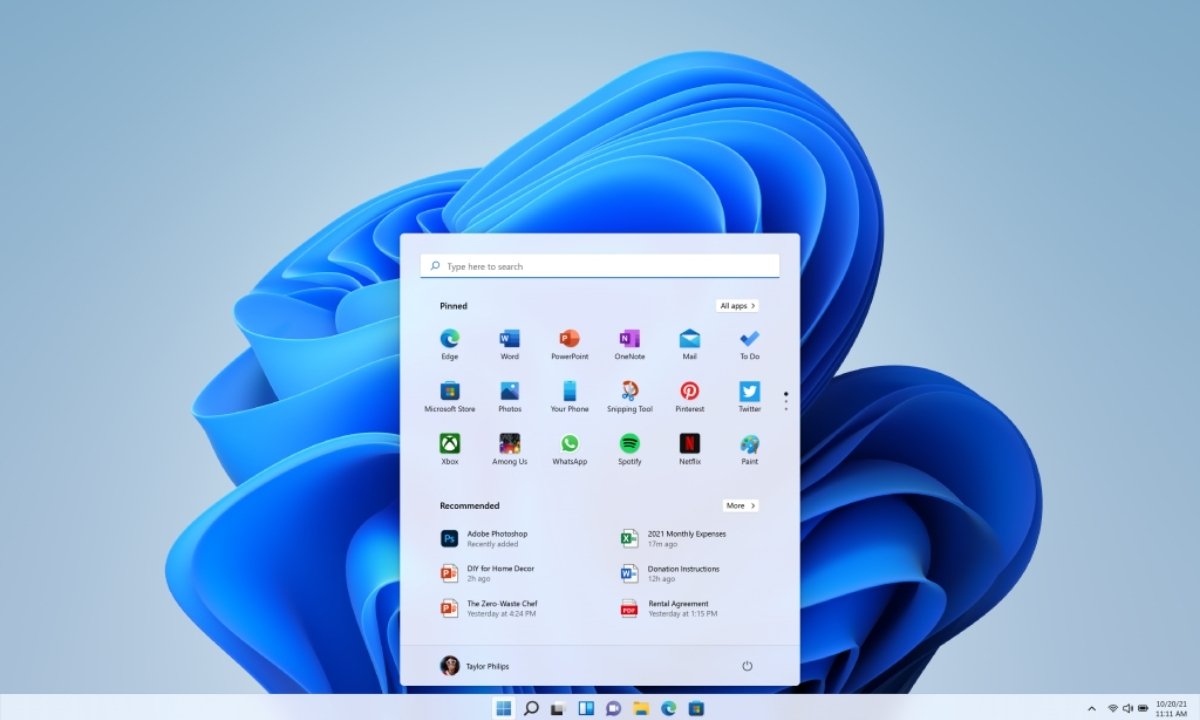
    1. Redesigned Start Menu

    Microsoft has given the Start Menu a complete visual overhaul.
    Pinned apps now appear at the top, suggestions in the middle, and the full list of applications at the bottom. Users can switch between category view, compact grid, or classic list, giving more flexibility in how apps are displayed.

    You can also:

    • Show or hide recommended apps
    • Display more pinned icons by default
    • Add system folders like Settings and File Explorer for one-click access

    The result is a cleaner, more customizable Start Menu designed around user preference.

    2. Smarter Energy Efficiency

    The new CPU throttling system helps lower power usage when the computer is idle, a big win for laptop and tablet users.
    Windows also captures performance logs when your system slows down, allowing Microsoft to analyze and fix common issues faster through the Feedback Hub.

    3. Quick Machine Recovery

    Microsoft has upgraded the Windows Recovery Environment with a new feature called Quick Machine Recovery.
    If your PC fails to start properly, Windows will automatically:

    • Boot into recovery mode
    • Go online to find repair files
    • Download necessary fixes directly from Microsoft

    For Home users, cloud recovery is turned on by default. Pro and Enterprise users can enable it manually for faster system repair.

    4. Widgets on the Lock Screen

    You can now personalize the lock screen with widgets that display real-time weather, stock updates, countdowns, or calendar events.
    A new “Discover Widgets” section helps you explore and add more widgets directly from the lock screen settings giving quick access to essential info without unlocking your PC.

    AI Features and Copilot+ Integration

    The 25H2 update also activates several AI-driven tools that were limited in version 24H2, including:

    • AI Actions in File Explorer
    • Click to Do (a Copilot+ PC feature)
    • Agent in Settings (Copilot+ PC feature)

    These features make Windows 11 more intelligent, allowing users to automate tasks and interact with their system more naturally.

    Why You Should Update

    With better energy optimization, enhanced recovery options, and AI integration, the Windows 11 25H2 update focuses on both performance and convenience.
    It’s lighter, faster to install, and adds smarter tools that make Windows 11 feel more modern and adaptive.

    To get the update, head to Settings → Windows Update → Check for updates, and let your PC handle the rest.

    Check out the Latest Tech News

    Windows
    Share. Facebook Twitter Pinterest LinkedIn Tumblr Email

    Related Posts

    Ai+ Expands Ecosystem Ambitions with Nova Series Launch, Tablet Debut, and New Wearables

    April 24, 2026

    From $350 Billion to $4 Trillion: Tim Cook’s Apple Legacy Explained

    April 21, 2026

    Canva Unveils AI 2.0: A Major Shift Toward an AI-First Creative Platform

    April 16, 2026

    1 Comment

    1. Pingback: WhatsApp Status iOS Update Lets You Share on Instagram

    Top Posts

    Ai+ Expands Ecosystem Ambitions with Nova Series Launch, Tablet Debut, and New Wearables
    April 24, 2026
    From $350 Billion to $4 Trillion: Tim Cook’s Apple Legacy Explained
    April 21, 2026
    Canva Unveils AI 2.0: A Major Shift Toward an AI-First Creative Platform
    April 16, 2026
    Nothing Warp Lets You Instantly Send Files Between Android, Mac and PC
    April 15, 2026
    Logitech Launches PRO X2 SUPERSTRIKE Gaming Mouse with New Click Technology
    April 9, 2026
    Exhibit Magazine | April 2026
    Stay In Touch
    • Facebook
    • YouTube
    • TikTok
    • Twitter
    • Instagram
    • Pinterest
    • LinkedIn
    • Reddit

    Subscribe to Updates

    Latest Posts
    Best Gadgets To Use

    Oakter Mini UPS Fiber: Is this the Best Mini UPS during Power Outages!

    Best Gadgets To Use By Shintu DhangMay 4, 2026
    Auto & EV

    Oben Rorr EVO Breaks Cover with Smart Tech and Real-World Focus

    Auto & EV By Sohil NikamApril 30, 2026
    Fashion

    Royal Enfield Extends Legacy into Apparel with Heritage Collection

    Fashion By Sohil NikamApril 29, 2026

    Exhibit.Tech, we’re your one-stop destination for everything tech! Whether it’s breaking news about the latest launches from giants like Sony, Vivo, Apple, Huawei, OnePlus, Sennheiser, Poco, and more, or in-depth reviews of mobiles, smartwatches, headphones, TVs, and earbuds – we’ve got you covered.

    Our reviews go beyond the surface, highlighting the pros and cons to help you make informed buying decisions. We’re here to simplify your tech journey with practical tips, tricks, and comprehensive “how-to” guides across a wide range of topics.

    Think of us as your friendly tech companion, helping you stay updated and make sense of the ever-evolving tech world with clarity and ease. At Exhibit.Tech, we make tech work for you!

    Most Popular

    Apple Is About to Reinvent Siri Forever A Standalone AI App Could Change Your iPhone Experience

    March 26, 202631 Views

    Canva’s New Magic Layers Feature Turns AI Images Into Fully Editable Designs

    March 13, 202647 Views

    ChatGPT Just Got a Major Learning Upgrade: Math and Science Now Come Alive With Interactive Visuals

    March 11, 202633 Views
    Our Pick

    WhatsApp’s New ‘Guest Chats’ Could Let You Message People Without the App: Here’s How It Works

    March 17, 2026

    Instagram to Kill Encrypted DMs After May 8: Here’s What It Means for Your Chats

    March 17, 2026

    Inside Samsung’s AI Vision: A Conversation with JB Park and Won-Joon Choi in San Francisco

    March 16, 2026
    Facebook X (Twitter) Instagram Pinterest YouTube
    • About Us
    • Careers
    • Contact Us
    © 2026 Exhibit Technologies | All Rights Reserved

    Type above and press Enter to search. Press Esc to cancel.