

Close Menu

    Subscribe to Updates

    Get the latest creative news from FooBar about art, design and business.

    What's Hot

    Sonia Shenoy | Creator Of The Month

    January 23, 2026

    Vedansh Kumar, Head of Brand Marketing, boAt – CMO Special

    January 22, 2026

    Pratip Francis, General Manager – Brand Marketing, MRF – CMO Special

    January 22, 2026
    Facebook X (Twitter) Instagram YouTube
    • Subscribe to the Magazine
    • Join our Newsletter
    • BBC TopGear India
    • Influencer News
    Friday, January 23
    Facebook X (Twitter) Instagram Pinterest YouTube Tumblr LinkedIn
    Exhibit TechExhibit Tech
    • Home
    • Tech & AI
      • Tech News
      • Tech Launches
      • Tech Features
      • Gaming
      • AI & Robotics
      • Social Media
      • Cybersecurity
      • FinTech
      • Crypto
      • Space
      • Software & Apps
    • Reviews
      • Smartphone Reviews
      • Smartwatch Reviews
      • Headphone Reviews
      • Laptop Reviews
      • Tablet Reviews
      • Earbud Reviews
      • Camera
      • Speakers
      • PC components
      • Accessories
      • Best TV Reviews in India – Find Your Next Screen with Exhibit.tech
      • Compare the Best Gadgets in India – Smartphones, Laptops, Wearables & More
      • Best Gadget to use
    • Auto
      • Auto News
      • Auto Reviews
      • Auto Tech
      • Vehicles
        • Cars
        • Bikes
    • Lifestyle
      • Travel
      • Entertainment
        • Fashion
        • Sports
        • OTT
        • Music
        • Movies
      • Watches
      • Health
      • Sneakerhead
      • Lifestyle Features
    • Guides
      • Explained
      • How To’s
      • How Big Is
      • Tips and Tricks
      • Screw Ups
    • Interviews
      • Creators
      • Tech Talks
      • Celebrities
      • Top 100 Leaders
        • Tech & Auto 2025
      • Founder’s club
      • Petrol Head
      • Marketing Minds
      • Editor’s note
    • Events
      • Influencex Awards
        • InfluencEX Awards Winners 2025
        • InfluencEX Awards Winners 2024
        • InfluencEX Awards Winners 2023
      • Exhibit Tech Awards
        • Tech Awards Winners 2025
        • Tech Awards Winners 2024
        • Tech Awards Winners 2023
      • Tech Fashion Tour
      • TopGear India Awards
    • Deals and Offer
    Exhibit TechExhibit Tech
    Home >> Tips and Tricks >> A Complete Guide to Apple’s Live Voicemail in iOS 18
    Tips and Tricks

    A Complete Guide to Apple’s Live Voicemail in iOS 18

    By Sandesh BhosleNovember 18, 20243 Mins Read
    Facebook Twitter Pinterest LinkedIn Tumblr Email
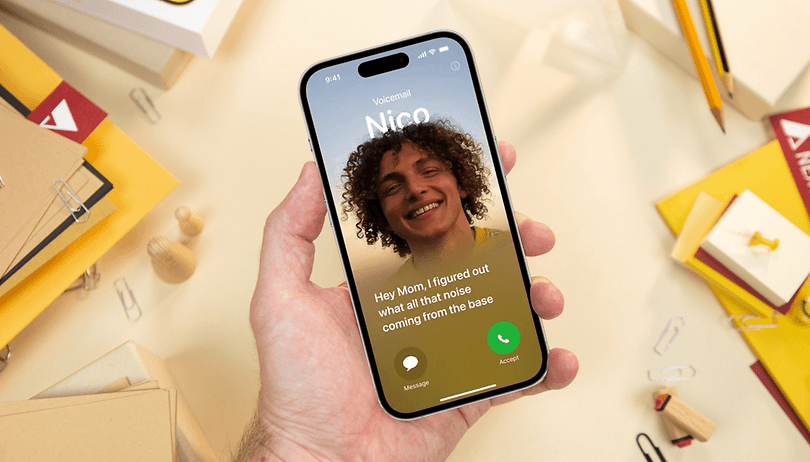
    Apple’s Live Voicemail
    Share
    Facebook Twitter LinkedIn Pinterest Email

    With the introduction of iOS 18, Apple has redefined the voicemail experience with Live Voicemail, a feature designed to make missed calls more interactive and manageable. Live Voicemail transcribes messages in real-time, giving users the option to either listen to the voicemail or read a transcription as it’s being left. This innovative approach to voicemail strikes a balance between convenience and control, offering users a modern solution to an old-school problem.

    While reactions to Live Voicemail have been mixed, it undeniably offers a glimpse into Apple’s vision of seamless communication. For some, it’s a game-changer that makes voicemail more accessible, while others view it as just another feature to disable. Love it or leave it, Live Voicemail is enabled by default in iOS 18, making it one of the most talked-about updates in Apple’s latest operating system.

    A Closer Look at How Live Voicemail Works

    Apple’s Live Voicemail transforms the way users interact with unanswered calls, blending real-time transcription with intuitive functionality. Here’s how it works:

    Automatic Answering
    When an incoming call goes unanswered, Live Voicemail takes over, allowing the caller to leave a message as usual.

    Real-Time Transcription
    As the caller speaks, their message is transcribed in real-time and displayed on the user’s screen. This allows users to quickly assess the urgency of the voicemail without needing to play it back.

    Dual Playback Options
    Users can choose to either listen to the voicemail or read the transcription. This flexibility is ideal for situations where audio playback may not be feasible, such as in meetings or public spaces.

    Apple’s Live Voicemail

    On-Device Storage
    The audio and text versions of the voicemail are stored locally on the device, ensuring both accessibility and privacy.

    Custom Greetings
    For a more personalised touch, users can set custom voicemail greetings through the Phone app’s settings, making the feature suitable for personal and professional use.

    Storage and Privacy

    One of Live Voicemail’s standout features is its commitment to privacy. All recordings and transcriptions are processed locally on the iPhone, eliminating the need for cloud-based storage or external servers. This means your voicemails remain on your device, providing peace of mind for privacy-conscious users. Apple’s on-device processing not only enhances security but also ensures that the feature operates efficiently without requiring an internet connection. It’s a testament to Apple’s ongoing focus on safeguarding user data while delivering advanced functionality.

    Language Support and Transcription Quality

    Currently, Live Voicemail’s transcription works best in English, with limited support for a few other languages. For callers using non-supported languages, the transcriptions may be inaccurate or even garbled, especially in the case of regional languages of India. While this limitation may be a drawback for some users, Apple is expected to expand language support in future updates. For now, users relying on English can enjoy highly accurate transcriptions, making Live Voicemail particularly useful in professional and personal contexts.

    Turning Off Live Voicemail

    Apple’s Live Voicemail

    Not every user will find Live Voicemail indispensable, and thankfully, Apple provides an easy way to disable it. If you prefer to manage your voicemails the traditional way, here’s how to turn off the feature:

    1. Open the Settings app.
    2. Scroll to the Phone section.
    3. Tap on Live Voicemail and toggle it off.

    If you change your mind, re-enabling Live Voicemail is just as straightforward, simply return to the settings and toggle it back on.

    Apple continues to iterate and expand on Live Voicemail, potentially improving transcription quality and language support. The company is paving the way for a smarter, more intuitive voicemail experience. Whether you embrace or disable it, Live Voicemail reflects Apple’s knack for transforming the simplest features into something uniquely valuable.

    apple Apple Voicemail iPhone
    Share. Facebook Twitter Pinterest LinkedIn Tumblr Email

    Related Posts

    iOS 26.3 Could Change How Your iPhone Gets Security Updates Forever!

    January 7, 2026

    Apple’s Biggest Year Ever? Foldable iPhone and Touchscreen MacBook Tipped for 2026

    December 29, 2025

    Apple & Google Team Up to Make Android iPhone Switching Easier Here’s What We Know

    December 10, 2025

    Comments are closed.

    Top Posts

    iOS 26.3 Could Change How Your iPhone Gets Security Updates Forever!
    January 7, 2026
    Apple’s Biggest Year Ever? Foldable iPhone and Touchscreen MacBook Tipped for 2026
    December 29, 2025
    Apple & Google Team Up to Make Android iPhone Switching Easier Here’s What We Know
    December 10, 2025
    Apple Just Downgraded the iPhone 17 Pro Camera and Fans Are Furious
    December 5, 2025
    Apple Pushes Back Against India’s Order to Preload Sanchar Saathi App
    December 3, 2025
    Exhibit Magazine | January 2026
    Stay In Touch
    • Facebook
    • YouTube
    • TikTok
    • Twitter
    • Instagram
    • Pinterest
    • LinkedIn
    • Reddit

    Subscribe to Updates

    Latest Posts
    Creators

    Sonia Shenoy | Creator Of The Month

    Creators By Exhibit StaffJanuary 23, 2026
    Interviews

    Vedansh Kumar, Head of Brand Marketing, boAt – CMO Special

    Interviews By Aadithya HarishJanuary 22, 2026
    Interviews

    Pratip Francis, General Manager – Brand Marketing, MRF – CMO Special

    Interviews By Aadithya HarishJanuary 22, 2026

    Exhibit.Tech, we’re your one-stop destination for everything tech! Whether it’s breaking news about the latest launches from giants like Sony, Vivo, Apple, Huawei, OnePlus, Sennheiser, Poco, and more, or in-depth reviews of mobiles, smartwatches, headphones, TVs, and earbuds – we’ve got you covered.

    Our reviews go beyond the surface, highlighting the pros and cons to help you make informed buying decisions. We’re here to simplify your tech journey with practical tips, tricks, and comprehensive “how-to” guides across a wide range of topics.

    Think of us as your friendly tech companion, helping you stay updated and make sense of the ever-evolving tech world with clarity and ease. At Exhibit.Tech, we make tech work for you!

    Most Popular

    OpenAI Introduces ChatGPT Translate and It Does More Than Google Translate

    January 16, 2026

    Alexa Plus Comes to the Web and Amazon Is Rethinking AI Assistants

    January 7, 2026

    OpenAI’s First Hardware Could Ditch Screens and Rely Fully on Voice

    January 6, 2026
    Our Pick

    Pratip Francis, General Manager – Brand Marketing, MRF – CMO Special

    January 22, 2026

    Abhishek Shetty, Head of Marketing – Swiggy Instamart – CMO Special

    January 22, 2026

    Sooraj Balakrishnan, Associate Director & Head of Marketing, Acer India – CMO Special

    January 22, 2026
    Facebook X (Twitter) Instagram Pinterest YouTube
    • About Us
    • Careers
    • Contact Us
    © 2026 Exhibit Technologies | All Rights Reserved

    Type above and press Enter to search. Press Esc to cancel.