



Close Menu

    Subscribe to Updates

    Get the latest creative news from FooBar about art, design and business.

    What's Hot

    Qualcomm Signals Two-Pronged Flagship Chip Strategy Ahead of Snapdragon Summit

    August 22, 2026

    CP Plus CP-E35Q Wi-Fi Smart CCTV camera Review

    August 21, 2026

    Nike After Dark Tour Returns to Mumbai with Women-Only 10K on 12 December 2026

    August 21, 2026
    Facebook X (Twitter) Instagram YouTube
    • Subscribe to the Magazine
    • Join our Newsletter
    • BBC TopGear India
    • Influencer News
    Monday, August 24
    Facebook X (Twitter) Instagram Pinterest YouTube Tumblr LinkedIn
    Exhibit TechExhibit Tech
    • Home
    • Tech & AI
      • Tech News
      • Tech Launches
      • Tech Features
      • Gaming
      • AI & Robotics
      • Social Media
      • Crypto
      • Space
      • Software & Apps
    • Reviews
      • Smartphone Reviews
      • Smartwatch Reviews
      • Headphone Reviews
      • Laptop Reviews
      • Tablet Reviews
      • Earbud Reviews
      • Camera
      • Speakers
      • PC components
      • Accessories
      • Best TV Reviews in India – Find Your Next Screen with Exhibit.tech
      • Compare the Best Gadgets in India – Smartphones, Laptops, Wearables & More
      • Best Gadget to use
    • Auto
      • Auto News & Reviews
      • Auto Tech
      • Vehicles
        • Cars
        • Bikes
    • Lifestyle
      • Travel
      • Entertainment
        • Fashion
        • Sports
        • OTT
        • Music
        • Movies
      • Watches
      • Health
      • Sneakerhead
      • Lifestyle Features
    • Guides
      • Explained
      • How To’s
      • How Big Is
      • Tips and Tricks
      • Business Stories
      • Deals and Offer
    • Interviews
      • Creators
      • Tech Titans
      • Tech Talks
      • Celebrities
      • Top 100 Leaders
        • Tech & Auto 2025
      • Petrol Head
      • Marketing Minds
      • Editor’s note
    • Events
      • Influencex Awards
        • InfluencEX Awards Winners 2025
        • InfluencEX Awards Winners 2024
        • InfluencEX Awards Winners 2023
      • Exhibit Tech Awards
        • Tech Awards Winners 2025
        • Tech Awards Winners 2024
        • Tech Awards Winners 2023
      • Tech Fashion Tour
      • TopGear India Awards
    • Indisciplined Leaders
    Exhibit TechExhibit Tech
    Home >> How To's >> WhatsApp Rolls Out Music Status Feature and Default App Support on iPhones
    How To's

    WhatsApp Rolls Out Music Status Feature and Default App Support on iPhones

    By Aadithya HarishApril 7, 20253 Mins Read
    Facebook Twitter Pinterest LinkedIn Tumblr Email
    The new update on Whatsapp makes it very Instagram worthy
    The new update on Whatsapp makes it very Instagram worthy
    Share
    Facebook Twitter LinkedIn Pinterest Email

    Meta owned WhatsApp has rolled out an exciting new feature that lets users add music to their WhatsApp Status, making it even more fun and expressive to share moments with friends and family. Users can now select specific parts of a song and pair them with photos or videos in their status updates, similar to features seen on Instagram and Facebook Stories.

    Additionally, iPhone users can now set WhatsApp as their default messaging or calling app, streamlining communication through their favorite platform.

     How to Add Music to WhatsApp Status
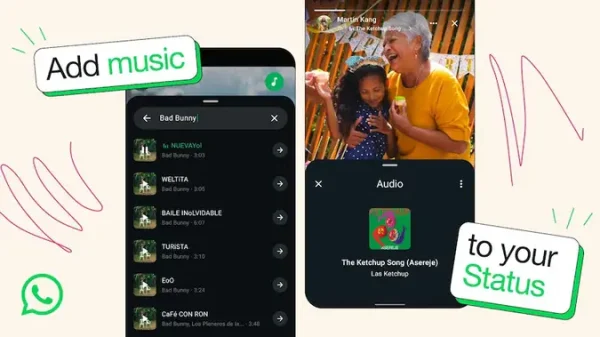
    Music feature on Whatsapp

    The music status feature is gradually rolling out to both Android and iOS users worldwide. Here’s a quick step-by-step guide to using it:

    1. Open WhatsApp and navigate to the “Updates” tab.
    2. Tap “Add Status” and choose a photo or video from your gallery.
    3. On the status edit screen, tap the new music icon located at the top.
    4. Search for a song or browse from WhatsApp’s extensive music library.
    5. Tap the arrow icon next to your chosen track to enter the editing screen.
    6. Select the desired portion of the song:
    • 15 seconds for photo statuses.
    • Up to 60 seconds for video statuses.
    • Tap “Done”, then hit the send button to upload your musical status.

    Also Read: How to Activate Apple Intelligence on iPhones in India?

    With access to millions of songs, this new addition brings WhatsApp Status updates closer to what users love on platforms like Instagram Stories or Facebook.

     Set WhatsApp as the Default Messaging or Calling App on iPhone

    Whatsapp-default-calling-messaging-app-iPhone

    In another major update, iPhone users running iOS 18.2 or later can now set WhatsApp as their default messaging and calling app—a first for Apple devices. This means users can directly make calls or send texts via WhatsApp when clicking on a phone number or contact, bypassing the built-in Phone or Messages apps.

    How to Make WhatsApp the Default App on iOS:

    1. Open your iPhone’s Settings.
    2. Go to the “Apps” section.
    3. Tap on “Default Apps”.
    4. Select either “Messaging” or “Calling”.
    5. Choose WhatsApp from the list of available apps.

    Also Read: ChatGPT on WhatsApp

    This feature aligns with Apple’s gradual approach to offering more flexibility in app defaults, giving users greater control over how they communicate.

     Final Thoughts

    These updates reflect WhatsApp’s ongoing commitment to enhancing user experience and keeping up with trends in social sharing and customized communication. From adding background music to status updates to becoming the go-to calling app on iPhones, WhatsApp continues to evolve in ways that cater to a modern, mobile-first audience.

    apple Whatsapp
    Share. Facebook Twitter Pinterest LinkedIn Tumblr Email

    Related Posts

    Apple releases iOS 26.5 Developer Beta 1 for iPhones: What’s new and how to update

    March 31, 2026

    Switching Phones? Here’s How to Transfer WhatsApp Chats Between Android and iPhone Without Losing Data

    March 30, 2026

    Apple Is About to Reinvent Siri Forever A Standalone AI App Could Change Your iPhone Experience

    March 26, 2026

    Comments are closed.

    Top Posts

    Apple releases iOS 26.5 Developer Beta 1 for iPhones: What’s new and how to update
    March 31, 2026
    Switching Phones? Here’s How to Transfer WhatsApp Chats Between Android and iPhone Without Losing Data
    March 30, 2026
    Apple Is About to Reinvent Siri Forever A Standalone AI App Could Change Your iPhone Experience
    March 26, 2026
    iPhone 17e Might Be the Upgrade You’re Actually Looking For in 2026
    March 23, 2026
    Google’s New Android Update Lets You Install Any App Safely: Here’s How It Works
    March 23, 2026
    Exhibit Magazine | Annual Issue 2026
    Stay In Touch
    • Facebook
    • YouTube
    • TikTok
    • Twitter
    • Instagram
    • Pinterest
    • LinkedIn
    • Reddit

    Subscribe to Updates

    Latest Posts
    Tech News

    Qualcomm Signals Two-Pronged Flagship Chip Strategy Ahead of Snapdragon Summit

    Tech News By Sohil NikamAugust 22, 2026
    Accessories

    CP Plus CP-E35Q Wi-Fi Smart CCTV camera Review

    Accessories By Shintu DhangAugust 21, 2026
    Tech Features

    Nike After Dark Tour Returns to Mumbai with Women-Only 10K on 12 December 2026

    Tech Features By Shintu DhangAugust 21, 2026

    Exhibit.Tech, we’re your one-stop destination for everything tech! Whether it’s breaking news about the latest launches from giants like Sony, Vivo, Apple, Huawei, OnePlus, Sennheiser, Poco, and more, or in-depth reviews of mobiles, smartwatches, headphones, TVs, and earbuds – we’ve got you covered.

    Our reviews go beyond the surface, highlighting the pros and cons to help you make informed buying decisions. We’re here to simplify your tech journey with practical tips, tricks, and comprehensive “how-to” guides across a wide range of topics.

    Think of us as your friendly tech companion, helping you stay updated and make sense of the ever-evolving tech world with clarity and ease. At Exhibit.Tech, we make tech work for you!

    Most Popular

    From Consumers to Creators: Inside India’s Quest for an Indigenous AI Cloud

    August 15, 202611 Views

    How Vormetric Protects Your Data: An Overview Of Key Features

    September 5, 202443 Views

    Are AI-Generated Images and Videos Becoming Impossible to Identify?

    June 26, 202650 Views
    Our Pick

    Building What Matters: boltt Founder Arnav Kishore on Company’s Smartphone Ambitions

    August 3, 2026

    “Consumers Want AI-Ready Laptops”: Dell’s Anurag Arora Talks XPS, Alienware and More

    July 29, 2026

    The Future is Vertical: Tuktuki Founder Anshita Kulshrestha Talks Microdramas and More

    July 28, 2026
    Facebook X (Twitter) Instagram Pinterest YouTube
    • About Us
    • Careers
    • Contact Us
    © 2026 Exhibit Technologies | All Rights Reserved

    Type above and press Enter to search. Press Esc to cancel.