


Close Menu

    Subscribe to Updates

    Get the latest creative news from FooBar about art, design and business.

    What's Hot
    8.3

    MSI Vector 16 HX AI Review: Desktop-Class Power in a Portable (But Heavy) Chassis

    March 6, 2026
    8.2

    Amazon Fire TV Stick 4K Select Review: Fast, Reliable, With Cloud Gaming Surprises

    March 6, 2026
    8.5

    Nothing Phone (4a) Review: Betting Big on Budget with a Glyph Twist

    March 5, 2026
    Facebook X (Twitter) Instagram YouTube
    • Subscribe to the Magazine
    • Join our Newsletter
    • BBC TopGear India
    • Influencer News
    Saturday, March 7
    Facebook X (Twitter) Instagram Pinterest YouTube Tumblr LinkedIn
    Exhibit TechExhibit Tech
    • Home
    • Tech & AI
      • Tech News
      • Tech Launches
      • Tech Features
      • Gaming
      • AI & Robotics
      • Social Media
      • Cybersecurity
      • FinTech
      • Crypto
      • Space
      • Software & Apps
    • Reviews
      • Smartphone Reviews
      • Smartwatch Reviews
      • Headphone Reviews
      • Laptop Reviews
      • Tablet Reviews
      • Earbud Reviews
      • Camera
      • Speakers
      • PC components
      • Accessories
      • Best TV Reviews in India – Find Your Next Screen with Exhibit.tech
      • Compare the Best Gadgets in India – Smartphones, Laptops, Wearables & More
      • Best Gadget to use
    • Auto
      • Auto News
      • Auto Reviews
      • Auto Tech
      • Vehicles
        • Cars
        • Bikes
    • Lifestyle
      • Travel
      • Entertainment
        • Fashion
        • Sports
        • OTT
        • Music
        • Movies
      • Watches
      • Health
      • Sneakerhead
      • Lifestyle Features
    • Guides
      • Explained
      • How To’s
      • How Big Is
      • Tips and Tricks
      • Screw Ups
    • Interviews
      • Creators
      • Tech Talks
      • Celebrities
      • Top 100 Leaders
        • Tech & Auto 2025
      • Founder’s club
      • Petrol Head
      • Marketing Minds
      • Editor’s note
    • Events
      • Influencex Awards
        • InfluencEX Awards Winners 2025
        • InfluencEX Awards Winners 2024
        • InfluencEX Awards Winners 2023
      • Exhibit Tech Awards
        • Tech Awards Winners 2025
        • Tech Awards Winners 2024
        • Tech Awards Winners 2023
      • Tech Fashion Tour
      • TopGear India Awards
    • Deals and Offer
    Exhibit TechExhibit Tech
    Home >> How To's >> How to Hide Your Likes on Instagram Reels
    How To's

    How to Hide Your Likes on Instagram Reels

    By Shintu DhangNovember 15, 20253 Mins Read
    Facebook Twitter Pinterest LinkedIn Tumblr Email
    Logo of Instagram
    Logo of Instagram
    Share
    Facebook Twitter LinkedIn Pinterest Email

    Instagram Reels, which features short videos that captivate millions, allows users to show appreciation for content by liking it. However, with recent updates, your likes are now more visible than ever. The new Friends tab in the Reels feed displays the profile pictures of friends who have liked a video, making your preferences public to your network. This change can feel invasive, exposing your personal tastes, from quirky memes to motivational clips to others. Fortunately, Instagram provides tools to help you reclaim your privacy. Whether you want to hide like counts on your own Reels or prevent others from seeing what you’ve liked, these steps enable you to create a more discreet experience.

    Hiding Like Counts on Your Own Reels

    If you are a content creator, hiding like counts shifts focus from vanity metrics to authentic engagement. This feature, available since 2021, integrates smoothly with Reels.

    Before Posting a Reel:

    1. Record or upload your video in the Reels editor.
    2. Tap “Next” to access sharing options.
    3. Scroll to “Advanced Settings.”
    4. Toggle on “Hide like count.”
    5. Share your Reel, viewers won’t see the total likes.

    For Existing Reels:

    1. Navigate to your profile and select the Reel.
    2. Tap the three dots (…) in the top right.
    3. Choose “Hide like count.” To reverse, select “Unhide like count.”

    This doesn’t affect your ability to view likes; only others are blinded to the numbers.
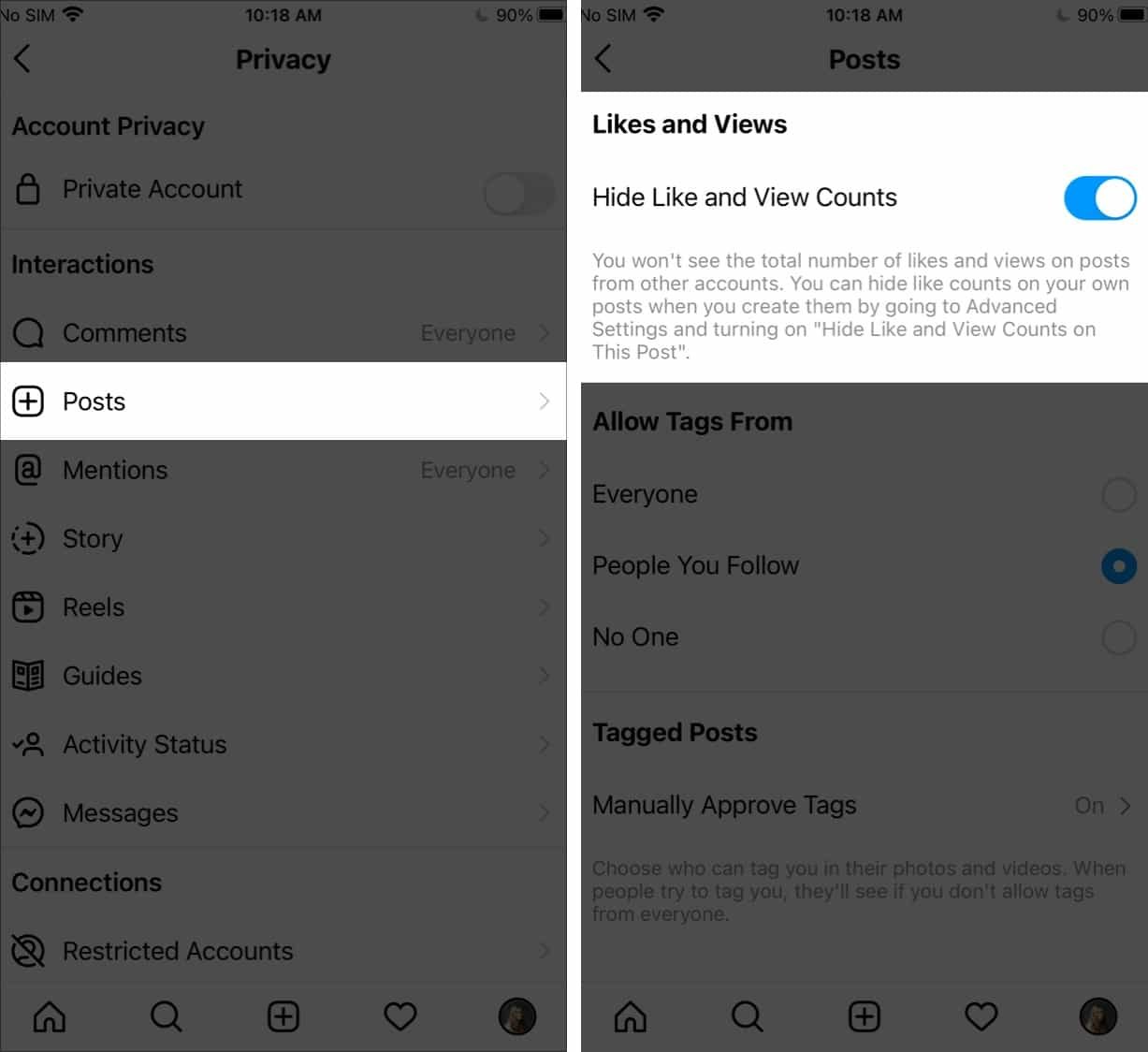
    Controlling Visibility of Your Likes on Others Reels

    The real game-changer addresses the Friends tab’s spotlight on your activity. As of mid-2025, Instagram rolled out granular controls here.

    1. Open Instagram settings (profile icon > three lines > Settings and privacy).
    2. Scroll to “Who can see your activity” or search for “Activity in Friends Tab.”
    3. Select “Likes and comments” or similar.
    4. Choose from options: Everyone, Followers only, Close Friends, or No one (total privacy).

    This hides your profile pic and interactions from the tab, reducing unwanted scrutiny. Note: It won’t erase past likes but prevents future visibility.

    Additional Privacy Tips

    To have more control over your social media experience, go to Settings > Privacy > Posts, Stories, and Reels to manage who can see your content. You might also consider muting accounts to reduce the influence of friends’ activity on your feed. If you continue to feel anxious, remember that hiding likes can lead to more authentic scrolling without judgment.

    By using these features, you can transform Reels from a popularity contest into a personal space. Privacy isn’t about being secretive; it’s about feeling comfortable in a connected world. Take control today and like freely.


    Share. Facebook Twitter Pinterest LinkedIn Tumblr Email

    Related Posts

    How to Change Your Username on Gmail

    February 23, 2026

    Google Docs Adds Gemini-Powered Audio Summaries: How It Works

    February 16, 2026

    Google Rolls Out Power Saving Mode for Maps on Pixel 10 Series: Here’s How It Works

    November 29, 2025

    Comments are closed.

    Top Posts

    How to Change Your Username on Gmail
    February 23, 202617 Views
    Google Docs Adds Gemini-Powered Audio Summaries: How It Works
    February 16, 20265 Views
    Google Rolls Out Power Saving Mode for Maps on Pixel 10 Series: Here’s How It Works
    November 29, 20251 Views
    How to Navigate Your iPhone with Your Eyes
    November 17, 20253 Views
    YouTube introduces Gemini-powered ‘Ask’ feature for PC and smartphone: Here’s how it works
    November 12, 20255 Views
    Exhibit Magazine | February – March 2026
    Stay In Touch
    • Facebook
    • YouTube
    • TikTok
    • Twitter
    • Instagram
    • Pinterest
    • LinkedIn
    • Reddit

    Subscribe to Updates

    Latest Posts
    Gadget Reviews

    MSI Vector 16 HX AI Review: Desktop-Class Power in a Portable (But Heavy) Chassis

    8.3 Gadget Reviews By Sohil NikamMarch 6, 2026
    Accessories

    Amazon Fire TV Stick 4K Select Review: Fast, Reliable, With Cloud Gaming Surprises

    8.2 Accessories By Sohil NikamMarch 6, 2026
    Gadget Reviews

    Nothing Phone (4a) Review: Betting Big on Budget with a Glyph Twist

    8.5 Gadget Reviews By Shintu DhangMarch 5, 2026

    Exhibit.Tech, we’re your one-stop destination for everything tech! Whether it’s breaking news about the latest launches from giants like Sony, Vivo, Apple, Huawei, OnePlus, Sennheiser, Poco, and more, or in-depth reviews of mobiles, smartwatches, headphones, TVs, and earbuds – we’ve got you covered.

    Our reviews go beyond the surface, highlighting the pros and cons to help you make informed buying decisions. We’re here to simplify your tech journey with practical tips, tricks, and comprehensive “how-to” guides across a wide range of topics.

    Think of us as your friendly tech companion, helping you stay updated and make sense of the ever-evolving tech world with clarity and ease. At Exhibit.Tech, we make tech work for you!

    Most Popular

    AI Impact Summit 2026 Positions India as a Global Leader in Responsible Artificial Intelligence

    February 27, 202622 Views

    Large Language Models (LLMs) Explained

    February 19, 202612 Views

    Google’s Big AI Push in India: 10,000 Schools, 20 Million Public Servants, and a $15 Billion Cloud Bet

    February 19, 202623 Views
    Our Pick

    Facebook Now Lets You Animate Profile Photos With Meta AI: Here’s What’s New

    February 13, 2026

    Snapchat’s New Arrival Notifications Feature Is a Game Changer for Safety, Here’s How to Set It Up

    February 11, 2026

    Instagram May Soon Let You Exit Someone’s Close Friends List

    February 2, 2026
    Facebook X (Twitter) Instagram Pinterest YouTube
    • About Us
    • Careers
    • Contact Us
    © 2026 Exhibit Technologies | All Rights Reserved

    Type above and press Enter to search. Press Esc to cancel.